Tampilkan postingan dengan label fitness. Tampilkan semua postingan

Selasa, 26 Juli 2016

Find Pokémon in 'Pokémon GO' With This Realtime Map App


If you've been hunting for Pokémon in the real world with the new hugely popular app, 'Pokémon GO' for iOS and Android, you'll know how frustrating it can be to locate the nearby ones around you.
Referred by some as the 'three step bug', sometimes Pokémon are shown on the nearby map, that simply aren't even there. 

Thanks to Pokémon GO's API, there are now websites and apps that can help you find the exact locations of the little Pocket Monsters! 

Available on iOS and Android, PokeWhere by Vylar will become your must have Pokémon GO companion app.

"PokeWhere is a Pokemon finder for the mobile game Pokemon Go that uses the most advanced API to give you the most accurate real time info about the Pokemon near you. The real time info is then displayed to you on the map with the exact locations of the Pokemon that have spawned near you. With PokeWhere you will never miss a beat and catch all the Pokemons.
PokeWhere is very simple to use all you have to do is press the my location button, which will bring you to where you are on the map and the Pokemons around you will show up, that's all. It will refresh as you walk. Now all you have to do now is start catching them all, it is as simple as that!" 

This app does work! It's NOT some user submitted app and because PokeWhere is in real-time, you'll know that the Pokémon are actually there to be caught! You can even move the map around, re-pin, and do some location scouting. 

While this app is a must have for all Pokémon Trainers, unfortunately it doesn't have the ability to search for particular Pokémon and show you there closest location. That would be a great useful feature that hopefully someone can create. But in the meantime, download PokeWhere and find the Pokémon near you! 

> PokeWhere is FREE to download - available for iPhone and Android phones. 

Kamis, 10 Maret 2016

How To Track Your Sleep On Your Apple Watch

Sleep++ promo image.
The Apple Watch can tap you with notifications and other important information, show your messages, you can take a call on the watch, you can track your daily fitness and measure your heart rate, and so much more... But it wasn't really designed to track sleeping. This is mainly for a couple of reasons; 1, you'd have to wear your Apple Watch while you sleep, which might be uncomfortable. And 2, the main reason, at night is when you'll need to charge your Apple Watch so it's ready for the next day.

However, the Apple Watch, with the help of a third party app, is more than capable of tracking you sleep. And since it only takes the Apple Watch two and a half hours to fully charge to 100%, you might be able to charge it at night while you get ready for bed and in the morning while you get ready for work or etc... And since for many users, the Apple Watch's battery is still left with at least a quarter or even third by the end of the night, it won't take the Watch a long time to charge, so you could theoretically wear your Apple Watch while you sleep.  

Sleep++ by Cross Forward Consulting, LLC, is an Apple Watch app designed to track and measure your sleep. Sleep++ uses the motion tracking capabilities of the Apple Watch to measure the duration and quality of your sleep.

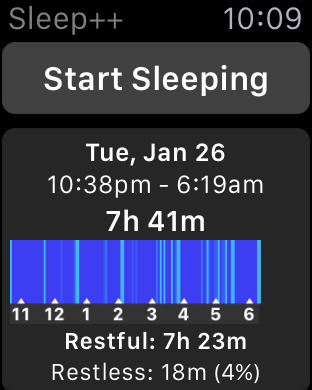
To track your sleeping with Sleep++ all you have to do is: wear your Apple Watch as you sleep, tell the app that you are going to sleep, and then when you wake up. Sleep++ will measure your movement during the night and then analyze your sleeping data and give you a graph and detailed breakdown, including the duration, how long you were restful, restless, awake, and between what times you got your best sleep.

I went ahead and tried out Sleep++. The app recommends that you put your Apple Watch into Airplane mode to preserve battery. As for effects on battery, out of the couple of times that I used that app, I saw a battery drop on average around 4-6% (with the Apple Watch in Airplane mode). Which is not too bad at all.

I will note a couple of things, first, make sure you give permission on your iPhone for Sleep++ to access your Movement and Fitness data - this is required for the app to work. Second, press 'Start Sleeping' on the Apple Watch app before you activate Airplane mode and then 'Stop Sleeping' after you've switched off Airplane mode, because I found that if I put the Watch into Airplane mode first, the data would never copy over to the app on the iPhone.

Sleep++ promo image.
As for the data Sleep++ collected for me during the night, it was interesting but I'm not sure how useful the data would really be for a continuos use. Sleep++ shows you the duration you were 'asleep' (because you told the app), The total time that your were restful, restless, and between what time you had your 'best sleep'. The graph that accompanies the data, shows you on a timescale, the points where in the night you had 'light sleep', or were restless.

An issue I had with Sleep++ was, while the app supports saving data to HealthKit, even with the setting on, there was no data added to the Health app. So there may be a bug there.

Sleep++ did seem to measure my moment well during the night, however I can't be certain - as I was asleep. And it was interesting data to see - even if I only use the app a few times. If you don't think you're getting a good nights sleep - try the app! You may find that you're quite restless during the night and might need to change things up a little to get a better nights sleep.

Sleep++ is FREE to download for iPhone (and Apple Watch) from the App Store.

> View Sleep++ in the App Store. 


Jumat, 25 April 2014

New Samsung Galaxy S5 and Gear Fit Ads - [VIDEO]

Dust & Water Resistant - Samsung GALAXY S5


This new Samsung Galaxy S5 advertisement shows off how resistant the smartphone is to dust and water.

Fitness - Samsung Gear Fit


This advertisement for the Gear Fit shows off how the device keeps track of your physical activities throughout the day, while altering you of notifications from your phone.


- See more Samsung videos on their YouTube page.

Rabu, 16 April 2014

How To Check Your Heart Rate On An iPhone or Android Phone - Instant Heart Rate

A lot of new technology has gone health related. There are FitBits, FuelBands, A Gear Fit, and Samsung has even put a hearth rate sensor onto their latest phone. Well I've been able to check my heart rate on a iPhone for years, thanks to a pretty cool app called - Instant Heart Rate - Heart Rate Monitor by Azumio Inc.


This heart rate monitor was even featured on the Dr. OZ show. It's simple to use, and seems fairly accurate. The app uses your iPhone's camera and camera light, to see into your finger to monitor the blood flow.

Instant Heart Rate - Heart Rate Monitor, also features a Real-time PPG graph, a Continuos or Auto-Stop mode. Heart Rate zones, and real-time global map. Pulse waveform graphs. Trends (or Graphs) that can show you information you've gathered by checking and tagging your heart rates. Registered users can also export their data. You can share to social networks.

All that comes in the app after purchase. Their is an optional additional in-app purchase for a 'StandUp test' which is for fatigue and fitness testing.   

If you're into checking your heart rate, this would have to be the current best heart rate app for iPhone's. It'll work great on any iPhone that has a camera and camera light. (so iPhone 4 and up). It is also compatible with any iPhone running on at least iOS 5.  

Instant Heart Rate - Heart Rate Monitor is available for iOS (iPhone) and Android. There is a few versions available, including a paid version for $1.99 and a Free (limited) version. You can find all the download links for Instant Heart Rate by clicking here. 

Senin, 03 Maret 2014

An iPhone App That Reminds You To Go To Bed

Sometimes we may get out of our sleeping schedule, or like to stay up a little late, and then feel so tired the next day because we only got a few hours of sleep. Well unless you're a kid, your mom might not be telling you to go to bed anymore. If you need a little help (or a reminder) that instead of being awake watching Letterman, you probably should be asleep, check out the iPhone app, To Bed by Tord Asnes.
To Bed, is a FREE iPhone app that'll remind you to go to sleep. To Bed uses information about your age, and next-morning wake-up times, to determine the best times for you to go to sleep. You get a push notification when you should start getting ready for bed.

Depending on your age, To Bed, recommends around about 7-8 hours of sleep, which seems to be scientifically accurate. You can change the recommend sleep time in the settings, to your own liking.

The look of the app is really... a guess 'fun', or childlike, is a more accurate description. The picture above shows the apps main screen. You'll see the moon, the remaining time until you should head to bed, and the button which looks like a nose to me, is your option button.

From the option button, you can access; Turn Notifications On/Off, Wake Times, & App Settings. On of the main things I don't like about this app is, you can't set sleep reminders for weekends. The app just assumes that everybody can sleep in on weekends. Well unless your five... and even then, kids have weekend activities.

Other than the missing weekend settings and a few graphical glitches in settings, To Bed, is a good app, if you need that little extra push to remind yourself to go to bed.

To Bed is FREE to download, and is available for iOS devices (designed for iPhone). 

Senin, 24 Februari 2014

Samsung Announces Addition To Wearable Line: The Gear Fit - Fitness Band

Samsung just the other day announced a couple of new Gear watches, but today, they've also announced a new addition to the wearable-tech-line, the Gear Fit.


The Gear Fit is a dedicated Fitness band to take on the Nike Fuelband, and FitBit bands, featuring; a 1.84” Curved Super AMOLED display screen (at 432x128). A typical battery life of 3~4 days. Including features: Pedometer, Exercise, Heart Rate, Sleep, Stopwatch, Timer. You can also see Notifications (SNS, Call, E-mail, Apps) on the band.

“Samsung understands that the next generation of wearable mobile solutions must directly reflect of the diverse interests and needs of consumers,” said JK Shin, CEO and President of IT & Mobile Division, Samsung Electronics. “In response, our Gear product portfolio continues to expand with unique devices for a wide range of lifestyles, including the new Gear Fit designed to help those consumers striving to live more fit and active lives without sacrificing their own personal style or their ability to stay connected on the go.”

The funny thing about Samsung's Gear Fit design is, a lot of tech writers, myself included, when we saw a fan-made concept idea for the 'iWatch', were saying just how awkward a vertical screen with the writing on the angle would be when wearing it on your wrist. You can never even read the time properly without tilting your head, or bending your arm in some awkward position. Designer, Todd Hamilton, 'fixed' this problem with the idea to turn the writing vertically.  


Samsung's Gear Fit will be available from April. 

Related Posts:
- Samsung Reveals Latest Flagship Phone - The GALAXY S5
- Samsung Announces Next Generation Smart Watches; Gear 2 & Gear 2 Neo

Minggu, 17 Februari 2013

runtastic Heart Rate - Measure Your Heart Rate On Your iPhone / Android

Did you know you can measure your heart rate on your iPhone! Well you can. I've been a fan of the app Instant Heart Rate by Azumio, but it's been a while since any update or new feature and improvements and the app doesn't even support the iPhone 5's taller screen...

Recently I found this app Heart Rate by runtastic and it may very quickly become my new favourite heart rate measuring tool.


To measure your heart rate just place you finger lightly over your phones camera and light. The measurement is fast and seems accurate.

The app looks cool and has some nice animations.

But the real nice thing about this app is the history feature and the way you can save your measurements.

When saving your result you have the options of selecting a category from either: General, Resting, Before Sport, After Sport and Max (During Sport). You can also select how you are feeling and add a note. 

In 'History', you're shown a graph and you can sort though the categories to only see results for example; when you were exercising, or maybe only when you were resting - so you can get an idea of your averages in each category.  

If you want to get social with your heart rate measurements you can upload to runtastic.com, email, or share on social network sites Facebook and Twitter.

While this is not a medical product (and should not be used as one) and this may not be one hundred percent accurate, it's a cool fitness app and a fun way to measure and keep track of your heart rate.

Available on: iOS (iPhone) and Android

Price: Free / PRO unlimited version $0.99 U.S.


App Store:

Google Play: