Tampilkan postingan dengan label kids. Tampilkan semua postingan

Selasa, 08 Desember 2015

'Power Rangers Dash' Adds Megaforce Rangers To Game


If you had finished collecting Power Rangers in the iOS and Android game, 'Saban's Power Rangers Dash', you now have a few more to go back in and collect. In a recent update, the game has added the six 'Power Rangers Megaforce' Rangers!

Here's a tip to collect the new Megaforce Rangers - go the the store and buy with "Purchase by Point" for 100P each - then when asked which season you'd like the Ranger from, choose 'Megaforce'.

Power Rangers Dash now features nine different seasons of Power Rangers, including; Mighty Morphin (minus the White Tiger Ranger), Wild Force, S.P.D., Mystic Force, Operation Overdrive, RPM, Samurai, and the latest team, Power Rangers Dino Charge. Here's still hoping they add some of the other classic seasons like; Dino Thunder, Zeo, Time Force, and In Space - to name a few.  

Power Rangers Dash is FREE to download from the iOS App Store and Android Google Play Store. 


Rabu, 18 November 2015

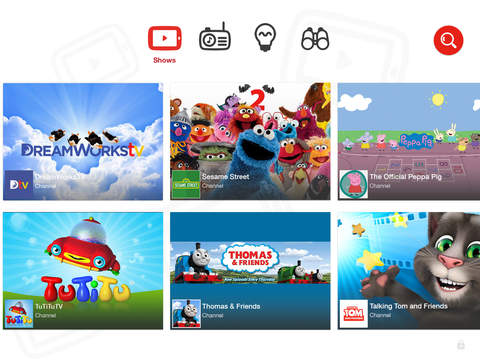
YouTube Kids App Now Available Internationally on iOS & Android


Google has today released it's YouTube Kids app internationally for certain countries outside the U.S.A. at the moment including; the UK, Ireland and Australia. YouTube Kids launched in the USA nine months ago.

YouTube Kids is a free app, designed for kids aged 5 and under. The app is designed to exclude content that may not be appropriate for a young audience - however YouTube notes that not all videos are manually reviewed.

When setting up at app, parents can choose whether they want to allow search. If you allow search, kids can search through millions of videos on YouTube (with restrictions). With search off, only the videos on the apps home screen and recommendations will be shown. However the security that keeps search off is four written numbers that the apps asks you to type in. So, if your kid can read numbers...  

The app is divided into four sections: Shows, Music, Learning, and Explore. Videos that can be expected on the app are favorites like; Thomas & Friends, Hi-5, Banana's in Pajamas, Sesame Street and more.

Also it's important to note that this app is not advertisement free. YouTube writes that the app "...contains paid ads in order to offer the app for free. Your child may also see videos with commercial content from YouTube creators that are not paid ads."

> View YouTube Kids app on the iTunes App Store


Selasa, 20 Oktober 2015

Crossy Road Adds 5 New Halloween Characters


Crossy Road - Endless Arcade Hopper by HIPSTER WHALE, today was updated to include new Halloween themed characters!

There are 5 new 'spooky' characters included; Pumpkin, Skeleton, Witch, Mummy, and Scaredy Cat.

The new characters can be purchased with real money via a in-app purchase, or by winning them in the prize machine.

The Crossy Road Halloween update is now available in the app store.

Click here to view more Halloween themed app reviews.


Rabu, 02 September 2015

'Pokemon Shuffle Mobile' For iOS & Android Now Available To Download


Pokémon Shuffle Mobile by The Pokemon Company is now available for iOS & Android. Pokémon Shuffle Mobile is a freemium puzzle game that was first released on the Nintendo 3DS.

Pokémon Shuffle Mobile features a puzzle game where battle wild Pokémon by lining up three or more Pokémon from the grid below.

The game features "lots of stages and lots of Pokémon", with additional stages and Pokémon planned for future updates.

In the game, you can move around Pokémon in a grid to line up matches of three or more. The more combinations you make, the better your score. You also have a limit to how many moves you can make to defeat the Pokémon you are battling. After defeating the Pokémon, you have the chance to catch it. Some Pokémon are easier to catch than others, but how many moves you had remaining will also play a factor. If you fail to catch a Pokémon, there will be a option to purchase a 'Great Poké Ball' to improve your chances. This costs in-game coins.

The game has a very 'cutesy' look and feel. Most of the problems, and downsides to the game are; your lives. They are not really lives, more like a token to play. It'll cost you one heart every time you play a stage. The max hearts that recharge is five. So, game play is quick and far between - as recharging takes a while.  You can always purchase more hearts in the game.

The other problem is the in-game coins. Together with the hearts, these two factors really hurt the game-play. You earn coins by playing and battling Pokémon. Coins can be used to purchase special power-ups or Poké Balls. The amount of coins you win is pretty low and it'll take a while to save up.

When you combine low capture rates of a lot of Pokémon, making replay and purchasing Poké Balls often required, the lack of time you can play for in one go, and the low payout of coins - the game to me feels like it pushes in-app purchases - if you want to have a good time playing.  This is often the problem with freemium games. I just don't know at this time, how far and how long you can really play for without feeling like you need put real money into this game. Maybe you won't ever need too. I don't know. I believe in-app purchases should enhance your game play experience, but not feel needed to play - and win. Let me know what you think, in the comments.


-> View Pokémon Shuffle Mobile on the iTunes App Store for iPhone, iPod Touch and iPad's or the Google Play Store for Android devices.


Rabu, 15 Juli 2015

Pokémon Shuffle Mobile - Match 'Em All Game Coming to iOS & Android


Pokémon is set to release a match-3 style puzzle game, like Candy Crush Saga, Candy Mania, Bejeweled, Angry Birds Fight!, and so on... for iOS and Android devices, sometime later this year (2015).

In Pokémon Shuffle Mobile, players will clear areas and battle wild Pokémon by matching up Pokémon of the same to create attacks, which you use to battle and defeat the Pokémon, before you run out of moves. You can then try and catch it!

Game features as stated in the trailer (video above):
"Match 3 or more Pokémon to launch an attack."
"Rack up combos to deal lots of damage."
"Catch wild Pokémon and add them to your collection."
"Create your own team and gain experience as you play!"
"Use items and Mega Evolution for powerful effects."  
There does seem to be a mixed range of Pokémon between new and old, judging from the trailer. It will feature the old favorites like; Charmander, Squirtle, Bulbasaur, and of course Pikachu. Also, Pokémon will gain experience and can evolve.

Pokémon Shuffle Mobile will be FREE to download, most likely with in-app purchases - available on the iTunes App Store and Google Play Store - sometime this year.

> Pokémon Shuffle Mobile [Official Website]

Minggu, 30 Maret 2014

Kids App DRAWNIMAL for iPhone/iPad Combines Learning The Alphabet & Art Into One


DRAWNIMAL by Lucas Zanotto is Apple's 'App Of The Week', which means you can download it for FREE this week! (Saving $1.99).

DRAWNIMAL is a app for young kids that combines the alphabet and art. The app contains minimalist animal character drawings, and has sounds that says the letters of the alphabet and gives you an animal example. For example when you press the play button, the voice will say: "A, for alligator."

To be honest, I don't like this app, and here's why:

First off, it's really simple. Yes, the app itself is made nicely, however - there is only one thing "A" is for. Once you run through the app, you're not getting anything different the second time.  

My second dislike of this app is with it's "art" element. The app tells you to place your device (the iPhone, iPod Touch or iPad) down on a piece of paper, or a surface you can draw on. And then as animation shows on the screen, draw around your device - completing the animal picture... Now, I don't have any kids, but the first thing that came to my mind was, I don't want marker or pencil markings on my devices. And that surely will happen with any kid ...and maybe some adults.  I'm sorry, but if you put a markers near your device, it's sure to get on it, eventually. And if the adult draws the picture, then what's the point? Also think about all the paper you're wasting, for half a drawing.  If you do this, please, at least use a whiteboard.

The app is also British. It says "zed" instead of "zee", and has a British accent. So americans, be warned.  There are five languages available: English, Spanish, French, Dutch, and Italian.


DRAWNIMAL is a cute app for kids. Currently free this week, as it's Apple's pick of the week. Regular price is $1.99. DRAWNIMAL is available for iOS (designed for both iPhone and iPad), and can be downloaded from the iTunes App Store

Kamis, 20 Maret 2014

Angry Birds Go! 'Sub Zero' Episode Is Here ...Sort Of. Download Now! [Pictures Included].

The Angry Birds Go! 'Sub Zero' episode is here! ...Sort of. It's actually a preview of the episode, which only contains the first track.

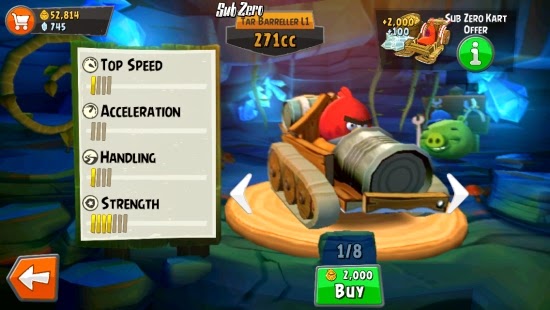
Here are some screenshots of the new levels: 

You'll have to buy an all new vehicle. There is only one available for payment with just coins. Upgrades are cheap at the moment, only about 500-600 for the first 'lines'.


 The tracks are on a snowy surface, where there will be a lot of drifting.

New Ice-Cream Splat event, replaces the fruit splat event, in 'Sub-Zero'. 

- Check you App Store for the update! 

Jumat, 14 Maret 2014

New Angry Birds EPIC Game Coming First To Australia and Canada


It was not long ago that Rovio teased a new Angry Birds game "Stella", and now they done it again! A short teaser that went out on Saturday showed off a Angry Bird in a medieval armor, with taglines, "The most epic soft launch ever" ... "Starting in Australia and Canada".  

What is this Epic Angry Birds game? Well according to the sources of AngryBirdsNest the new game will be a medieval RPG, called; Angry Birds EPIC.  Check out the alleged screenshots and details over at AngryBirdsNest

Rovio is keeping the Angry Birds team busy this year with the following still to come...
- Angry Birds GO! New 'Sub Zero' update.
- Angry Birds GO! Transformers (?)
Angry Birds Stella
- Angry Birds EPIC
- And possibly more...

Senin, 03 Maret 2014

An iPhone App That Reminds You To Go To Bed

Sometimes we may get out of our sleeping schedule, or like to stay up a little late, and then feel so tired the next day because we only got a few hours of sleep. Well unless you're a kid, your mom might not be telling you to go to bed anymore. If you need a little help (or a reminder) that instead of being awake watching Letterman, you probably should be asleep, check out the iPhone app, To Bed by Tord Asnes.
To Bed, is a FREE iPhone app that'll remind you to go to sleep. To Bed uses information about your age, and next-morning wake-up times, to determine the best times for you to go to sleep. You get a push notification when you should start getting ready for bed.

Depending on your age, To Bed, recommends around about 7-8 hours of sleep, which seems to be scientifically accurate. You can change the recommend sleep time in the settings, to your own liking.

The look of the app is really... a guess 'fun', or childlike, is a more accurate description. The picture above shows the apps main screen. You'll see the moon, the remaining time until you should head to bed, and the button which looks like a nose to me, is your option button.

From the option button, you can access; Turn Notifications On/Off, Wake Times, & App Settings. On of the main things I don't like about this app is, you can't set sleep reminders for weekends. The app just assumes that everybody can sleep in on weekends. Well unless your five... and even then, kids have weekend activities.

Other than the missing weekend settings and a few graphical glitches in settings, To Bed, is a good app, if you need that little extra push to remind yourself to go to bed.

To Bed is FREE to download, and is available for iOS devices (designed for iPhone). 

Sabtu, 01 Maret 2014

94 Degrees - Fun Visual Question & Answer 'Hot & Cold' Game For iPhone, iPad & Android

Ever play that game, when you say, "You're getting warmer... colder... hot...", well there is a fun visual question game available for iOS and Android devices, from developer, Scimob, called 94 Degrees, that uses a similar game play.


The way 94 Degrees works is, you are show an image, and given a something to find, and you must locate 'the answer', by placing pins on the picture, in the place you think is the answer.

As you can see from the image above, there is a human male body, showing all the muscles. In this level, you are told to find the "Pectoral Muscles". If you tap and place the pin near his knee, you get a temperature reading of 23 degrees, (which is cold), in the game the correct answer is always 94 degrees. Say you place the next pin on his abs. You get a reading of 74 degrees. So you can see that you're getting "warmer"to the correct answer. You add another pin a little higher and see that the correct answer is right around their somewhere. Finally you figure out the answer, and place a pin a bit higher on the "Pectoral Muscles" and you win, and move on to the next puzzle/ question.


For guess the correct answer, you get 4 coins.  Coins can be used to buy clues (or "jokers") to the correct answer. Jokers include;
- A Dice, that rolls, then adds the rolled number of pins somewhere on the image. One of the pins in the are correct place.
- A Compass, which will help guide you in the right direction.


Questions are from all sorts of general knowledge categories. You'll get, maps questions, math problems, human anatomy questions, fruit / vegetable questions, sport related questions, animal questions, cards, logos, and so on...  There's hundreds of levels.

You get 50 pins to play with, which recharge over time (or you can buy packs of pins). The free version of the game is very playable, but includes ads. If you upgrade to Premium for US$2.99, You'll get more features like; No Ads, Detailed Statistics, and more...

It's actually quite a fun and addicting game. You won't want to put it down!


94 Degrees is FREE to play, and is available to download on iOS (iPhone / iPod Touch / iPad) and Android devices.

Kamis, 27 Februari 2014

Make Your Own Flappy Bird Game In 15 Minutes With Simple Drag-And-Drop Tools


Code.org is helping kids to learn coding by developing their own Flappy Bird game. The creation method,
takes you through a simple "puzzle", drag and drop "code" blocks process to build the game.

The puzzle's for example are like; "The "when Run is clicked" block allows you to run code when your game first starts. Try setting the level speed and flapping to the target."

You can then see a 'set speed block' that you can edit the speed, and drag and drop to the 'When Run is clicked' block.

Then you would test your game, see if you made the right choice, and proceed to the next 'puzzle'.

It's a nice fun way to introduce kids, or adults, to coding. Although, I bet developers wished it was really this easy to make a game!


Selasa, 18 Februari 2014

Best Toys Controlled By A iPhone / iPad - i-Spy Tank

There are some awesome toys, or gadgets (depending on your age, lol), that can be controlled by a iOS device, like your iPhone, iPod Touch or iPad. Today we're going to look at the RC i-Spy Tank by Happy Cow.  


So what makes the i-Spy Tank so cool? It just looks like a remote control car, right? Wrong! This is far from just a remote control car! The camera on it's roof should be a good giveaway of it's features.

Controlled by your iOS device (iPad, iPhone or iPod Touch) by using the free app, i-spy toys, the i-Spy Tank can transmit sound and video back to your device, all in real time. The Tank's camera is manually adjustable, it can stream live video and sound with it's in-built microphone, and can even take still photos. It's actually like having your own little Mars Rover!

You can control the tank, by using the apps onscreen arrow controls, and your devices accelerometer, to make the device like a steering wheel. This little toy really makes a nice piece of spy-tech.

And now for some of the 'technical' information: The i-spy tank runs on it's own wireless connection with the range of up to 200 ft (unobstructed), and around 100 ft, around walls and in other rooms.


The i-Spy Tank, runs on 6 AA batteries, which of course are not included, and has a play time of around 80 minutes.

And sizes in at: 23.5 x 19 x 12 cm.

The RC i-Spy Tank will give hours of great fun for kids, adults, or spies. If you're looking for an awesome gift idea, this one is pretty hard to pass on!


*Also please note that apparently the iOS app does not currently work on devices running the latest software, iOS 7. If you don't have a iOS 6 device available, avoid buying for now.*


SPECIAL OFFER / SAVE OVER $50 OFF 
THE RETAIL PRICE: $149.99


(*OFFER POSTED FEBRUARY 18th 2014. PRICES MAY CHANGE AT ANYTIME). 


If a i-Spy Tank isn't your thing, there are some other great remote controlled toys by Happy Cow, like the Robotic UFO, or the i-Helicopter, which both, can fly! And are also really cool.


Jumat, 14 Februari 2014

The Best FREE PokeDex For iPhone and iPod Touch

Pokémon fans! wouldn't it be great to have a full Pokedex for free on your iPhone or iPod Touch? Well if you answered, yes, check out:


PokeDream Dex 


This Pokedex features all the Poke info from the games, and will be your ultimate guide. 

You have your basic information. Descriptions from the Nintendo games. Move lists. Locations. Images of the Pokemon's in the games. Evolutions guide, Abilities, and more....


The Pokedream, Pokedex features 718 Pokemon. I think it may be missing the Mega Evolution Pokemon - that information may be added at a later date.  You can sort by number, or alphabetically. 

The app is designed for iOS 7. The app looks good, and is easy to use. It is advertisement supported and features an ad at the bottom of the screen. 

The app is FREE to download for iOS devices.  Designed for iPhone and iPod Touch. It can work on a iPad, just not natively. 

A great free Pokemon Pokedex. Download PokeDream Dex from the App Store now! 

Rabu, 12 Februari 2014

First Look At New Angry Birds 'Adventure' Game


New Angry Birds Adventure game teaser. From @AngryBirds

As Tweeted by the Official Angry Birds Twitter account, a new 'big adventure' Angry Birds game, with new birds, is coming soon. Attached to the tweet was a picture of silhouettes of the new birds.

In another tweet, the @AngryBirds account says, more information about the game, and the games title will be revealed tomorrow!

Stay tuned!


Jumat, 07 Februari 2014

Currently Free: 'Power Rangers Legends' for iPhone & iPad

The Power Rangers are still going strong, and kicking the butt of evil space alien villains, while learning to work together as a team. The newest series, Power Rangers Super Megaforce, will begin in the USA on February 15th 2014 on Nickelodeon.

To get into the fighting spirit, why not download an app for free? From February 6th, the Power Rangers Legends (by Saban Brands LLC) game for iOS has gone free! (saving of $0.99).


The Legends game starts right back at the beginning, with the original Mighty Morphin' Power Rangers. You can play as the Green, Pink and unlock the Red Mighty Morphin' Ranger.

Power Rangers Legends features power-ups, weapons, boosts, different gear... that can be bought in the 'store'. And as the the game doesn't really pay out well and they aren't shy about offering you some in-app purchases to get some extra coins, powers and so on. Not a great thing for a supposably kids game.

And this game is not that easy, and can actually be quite hard... Not a great game for the easily frustrated.

The graphics are pretty good, 3D (not the glasses kind), Rangers sounds aren't accurate and are not from the show.

I wish I could say it's a fun, awesome game, but its not. It's too difficult for a kids game. With too many easily available in-app purchases.

But, hey, the game is currently free! So for the retro fans out there, download the game - it's fun for a little nostalgia.

And for fun, here is the original Green Ranger himself, "Tommy", playing the game on a iPhone. Also, if you're a fan of the show - go check out and like, Jason David Frank's Facebook page!


Power Rangers Legends

Available for: iOS (universal).

Price: $0.99, Currently Free (as of Feb 6th 2014).


Senin, 27 Januari 2014

Learn and Practice Geography with Aliens on iOS game - Aliens Abducted!


Aliens Abducted! is such a fun game. You play as a alien who has been abducted from his home planet, right before it's destroyed. You can given the chance to travel the universe with two other aliens, and name the countries of the earth, in some sort of quiz, by guessing from the countries flags and position on the planet.

The quiz is broken down into 32 levels.  There is also a 'free' mode, where you just keep answering until you lose all your lives.  There is also a endless-runner game (unlocked after earning 10 stars); where the alien (you play) has escaped and is on the run trying to escape!


Levels work by the UFO flying around the globe, and stopping at a country. You are given three options of country names and their flags. You must choose the correct country that corresponds with the country the UFO is hovering over. You have 10 seconds to answer and three lives. The longer you take to answer, the less points you earn.

Aliens Abducted! features cool graphics. Annoying sounds, but you can always turn down the volume. 160 countries and flags. A Library, that features information on countries.


There are also, according to the app, new game modes coming soon, including; Math, and Quotes.

Aliens Abducted! is two games in one. Have fun learning, then play some endless-runner game - shooting aliens!

The quiz element of the game is fun. A great way to practice geography, and learn. Aliens Abducted! is great fun for kids, and adults.

Aliens Abducted! is available for iOS devices (iPhone, iPod Touch, and iPad). Priced at $2.99.


Spinning a Wheel to Make Choices with iOS App - Decide Now!


Stuck making choices? Want to let fate decide, but you got more than the two options a coin can handle? Why not spin the wheel, and let it decide for you!


Decide Now! By Catforce Studio, is a fun entertainment app, that can help you make all sorts of decisions.


Decide Now! features:

- 10 preset wheel templates, that include topics like; Go out tonight, Should I...?, Where to eat?, Romantic ideas, 15 min ideas, and so on...

- The ability to make an unlimited number of your own templates.

- 8 different wheel color schemes.


The app is so easy to use. Tap the settings gear, pick one of the templates, or create your own. Then either tap the green button in the middle of the wheel, or flick the wheel with your finger.

You could use Decide Now! for a heaps of uses, I guess. You could make decisions, or maybe make a game...  Can't really think of any complaints. The app does what it says. The only thing I could says is, at the moment at least, the app still has a iOS 6 style interface. Maybe in the near future, they could update the interface.

Decide Now! is fun for all ages. The app is priced at $0.99, and is available for iOS (iPhone, iPod Touch, and iPad) devices.


Rabu, 01 Mei 2013

(Kids App): Learn How To Draw Dinosaurs on iPad with iLuv Drawing Dinosaurs HD - iOS App Review


iLuv Drawing Dinosaurs HD - Learn how to draw dinosaurs step by step 

$2.99 (Free for Limited Time)  - iPad
$0.99 - iPhone /  iPod Touch


Kids will love drawing with the iLuv Drawing Dinosaurs app, available for iOS.

In this app, your kids can learn to draw, with step by step tracing instructions and with voice guidance.

There are 19 different kid-ish cartoon looking Dinosaurs available to choose from.
Dinosaurs include the: T-Rex, Stegosaurs, Velociraptor, Triceratops, Pterodactyl and many more... If you feel like free-styling it, there's also a blank page available.


There are many tools including: Paint brush & pencils with many colors to choose from. Texture brush with different types of patterns and textures to choose from. Paint bucket tool to quickly fill in large areas.  There's a eraser, undo button, clip art images to add to your drawings and different backgrounds to finish off your image.

You can save your image into the apps drawings book, where you can edit your drawings later. Or you can save your drawing to your devices photo album. Also options to email or print.

While the app is intuitive, there is some learning. Like holding buttons down for a few seconds to open, or what each button does. But after a few drawing you'll quickly learn how to use the app.


My only criticism would be, some lines on the Dino's, like the body lines, crosses over the legs. You can see what I mean in my T-Rex drawing at the top of the page. I'm sure the kids won't find the over lapping lines a problem, but it's incorrect and this is a learning app.  

Kids will love learning how to draw with the iLuv Drawing app. And if they want more things to draw, there are also many other drawing apps from the creators available including; Vehicles, Monsters, People, Santa, Animals, and more. You can find all the apps available on the learnwithfunapps.com website.

There is a iPad and iPhone/iPod Touch version of iLuv Drawing Dinosaurs available. They are not universal apps, so if you want both you'd need to buy both. Personally, I wouldn't recommend the iPhone app just because drawing on a iPhone screen can be really difficult due to the size.


- Download iLuv Drawing Dinosaurs HD for iPad from the App Store.

Download iLuv Drawing Dinosaurs for iPhone from the App Store.

Senin, 22 April 2013

Tamagotchi L.i.f.e. App, Based On The Original - Made for iOS and Android


Tamagotchi L.i.f.e. 
FREE - iOS (iPhone/iPod Touch, iPad) and Android

If you remember Tamagotchi's then you're probably a kid of the 90's. Now 16 years after the original release, based on the original virtual pet, Tamagotchi is back in App form!

You can reminisce and relive the pixel fun all over again and remind yourself of how old you are now!

In case you don't remember, Tamagotchi's are your digital virtual pet. Just like real pets, you'd feed it, take care of it, and even (digitally) clean up after it. And if you didn't - your Tamagotchi would die! 

Tamagotchi's was more of a girl's device / game, not to say that some boys didn't have them, but Bandai later released Digimonwhich was more aimed at the male audience.

In the new version (app version), your Tamagotchi's are now in color with a higher resolution, and feature the original characters.  But don't worry, they all still look like 8-bit characters that you can barely make out.


- Download Tamagotchi L.i.f.e. on the iOS App Store

- Download Tamagotchi L.i.f.e. on Google Play

(Tamagotchi L.i.f.e. is currently only available to download in the United States and Canada).


Jumat, 29 Maret 2013

Kids Easter Themed Apps - Easter Rush - App Review

Continuing my Easter themed app reviews is Easter Rush By iLogos inc.


The Easter bunny is tipping the eggs off a bridge ...for some reason, and it's up to you to catch them in the basket below. 

All you need to do is move the basket from left to right and collect the eggs while avoiding other falling items. 

There is 80 playable levels in 4 different themed stages.

  
Could be great fun for kids.  On the downside: Unfortunately Easter Rush crashed a lot for me, especially on start-up. And the app does have a bit of a loading lag.

Easter Rush is available for iPad, iPod Touch and iPhone, free to try, full game costs $0.99 through a in-app purchase. There are also advertisements in the app - not sure if these go away if you purchase the full game.