Tampilkan postingan dengan label cartoon. Tampilkan semua postingan

Selasa, 26 Juli 2016

Find Pokémon in 'Pokémon GO' With This Realtime Map App


If you've been hunting for Pokémon in the real world with the new hugely popular app, 'Pokémon GO' for iOS and Android, you'll know how frustrating it can be to locate the nearby ones around you.
Referred by some as the 'three step bug', sometimes Pokémon are shown on the nearby map, that simply aren't even there. 

Thanks to Pokémon GO's API, there are now websites and apps that can help you find the exact locations of the little Pocket Monsters! 

Available on iOS and Android, PokeWhere by Vylar will become your must have Pokémon GO companion app.

"PokeWhere is a Pokemon finder for the mobile game Pokemon Go that uses the most advanced API to give you the most accurate real time info about the Pokemon near you. The real time info is then displayed to you on the map with the exact locations of the Pokemon that have spawned near you. With PokeWhere you will never miss a beat and catch all the Pokemons.
PokeWhere is very simple to use all you have to do is press the my location button, which will bring you to where you are on the map and the Pokemons around you will show up, that's all. It will refresh as you walk. Now all you have to do now is start catching them all, it is as simple as that!" 

This app does work! It's NOT some user submitted app and because PokeWhere is in real-time, you'll know that the Pokémon are actually there to be caught! You can even move the map around, re-pin, and do some location scouting. 

While this app is a must have for all Pokémon Trainers, unfortunately it doesn't have the ability to search for particular Pokémon and show you there closest location. That would be a great useful feature that hopefully someone can create. But in the meantime, download PokeWhere and find the Pokémon near you! 

> PokeWhere is FREE to download - available for iPhone and Android phones. 

Sabtu, 09 Juli 2016

How To Evolve Pokemon in 'Pokemon GO' on iOS and Android


To evolve a Pokemon in 'Pokemon Go' you need a certain amount of 'Candy' for that particular Pokemon. You can obtain more candy by catching the same Pokemon (or one of its other evolutions) multiple times. When you have enough candy, tap the "evolve" button. 


Selasa, 05 Juli 2016

'Pokémon GO' Available In App Store First Look and Walkthrough

Pokémon GO, the much anticipated virtual reality GPS game by Niantic, Inc. is now available to download in select countries (including; Australia and New Zealand) from the App Store and Google Play Store! U.S. Players, hang on!

Pokémon GO is the game that'll actually make you get up and move around, if you want to play. I know, doesn't really sound like their target audience, am I right? The game uses your GPS location to track your position and place certain Pokémon and other locations that you'll be familiar with from the games the TV series; like a Poké Gym or Poké Shop, around you in various nearby locations.

In the game, you'll be able to catch Pokémon, evolve Pokémon, hatch eggs, take on Gym battles, and much more...

Here is a quick first look walk-through of setting up 'Pokémon GO' for the first time! 


The first thing you'll be presented with is a sign up page! The only way you can sign up is with a Google account.

Next, the game tells you to "...be alert at all times." And to be aware of your surroundings. You know, because you'll never know where they'll place that rare Pokémon ...it could be in your neighbors house, in the middle of the ocean, or some other location that you'd need to trespass on.

Then you are presented with the almighty Terms and Conditions! There is also a little check box asking permission to send you emails about the game.

After accepting the Terms and Conditions, the game introduction begins!


We meet Professor Willow, an old guy with really good hair for his age, who tells you that the world is inhabited with creatures known as Pokémon ...that only your smartphone camera can see. Professor Willow then asks you for your help in his research, but it's really more of a rhetorical question, because you can't say "no!".

Your mission; find and collect Pokémon from everywhere!


Next up, it's time to create your character! You can choose whether "your style" is either a male or female. Which is lucky, because I am one of those.


Then, it's time to customize your avatar! You can customize your skin, hair, and eye color. Then customize your clothing. While there isn't a lot of item choices, you can pick and choose from a few different color options.


Once done customizing your character, it's time to catch your first Pokémon! Professor Willow gives you your first lot of Poké Balls to help you catch one.


Right nearby, luckily there is three Pokémon to choose from. A Charmander, a Bulbasaur and the best one of course, Squirtle. The game will then ask you to give it permission to access your camera, so it can show you your surroundings through your phones screen. You can switch this off at anytime.


Now it's time to catch your first Pokémon! Just swipe the Poké Ball on the screen to your target and wait for the ball to seal the deal.


After catching the Pokémon you get a few stats.


Now, after catching a Pokémon, Professor Willow asks you something he really should of asked you a lot earlier - your name. Kind of rude, but anyway. Now you'll go through the painful process of picking a username that hasn't already be taken!


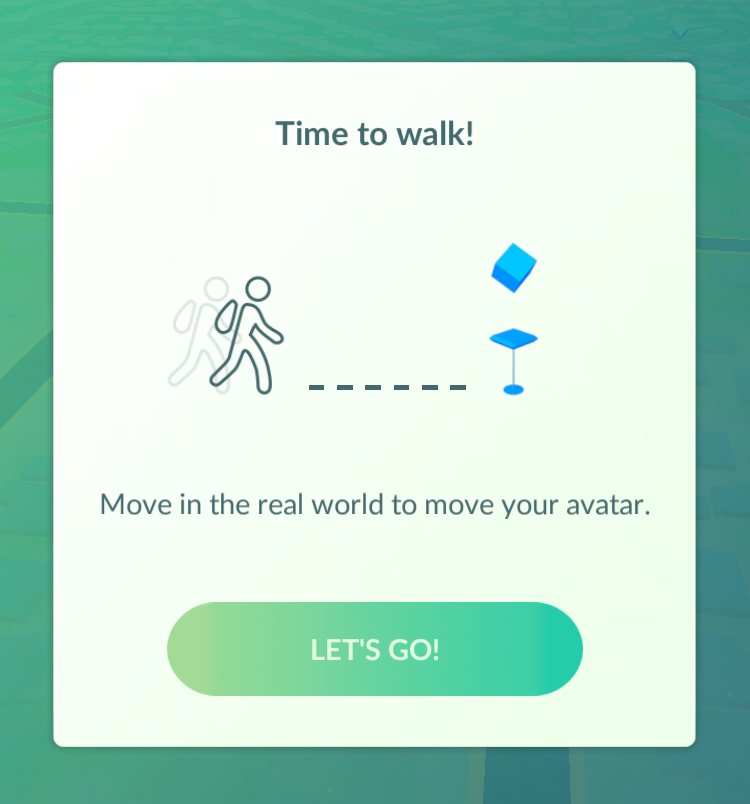
Time to Walk! The game tells you that to move your avatar, you'll need to walk / move around in the real world!


Now is the moment when you realize that this is as far as you can really go with this game, without going for a drive or a long walk...

Well that's the set up process for Pokémon GO! To play the game you will need to move around a lot! I don't know if this game would be great for kids - while it's great because it make you get up and move, it'll make them go to various locations and they'll either try alone, which you wouldn't want, or nag their parents to take them for a drive to who knows where! For adults who grew up with the original Pokémon games and TV series - you can now quit your job and travel the world to become that PokéMaster that you've always dreamed of becoming!

Have you downloaded the game, yet? Let me know what you think of Pokémon GO, in the comments!

Pokémon GO is available to download for FREE (with in-app purchases available) from the App Store.

-> Download Pokémon GO from the App Store


Sabtu, 12 September 2015

Smartphone App 'Pokémon GO' To Combine Virtual World with Real World


The Pokémon Company have announced a new smartphone game coming in 2016 that'll blend the real world and the virtual world.

The game titled 'Pokémon GO' which is being developed by Niantic Inc, uses players location data to encourage them to search the real world to find, battle and capture Pokémon.
"The Pokémon video game series has used real-world locations such as the Hokkaido and Kanto regions of Japan, New York, and Paris as inspiration for the fantasy settings in which its games take place. Now the real world will be the setting!"
'Pokémon GO' will feature many social features as players explore the outdoors, they'll be able to discover and help battle, catch, and trade Pokémon with their friends and other players.

A small device, the Pokémon GO Plus (developed and manufactured by Nintendo Co., Ltd.) will enable players to further play the game while not even using their smartphone. The device uses bluetooth and notifies the player about events like a nearby Pokémon - using LED and vibration. Players can also use the device to catch Pokémon or perform other simple actions.

'Pokémon GO' will be available as a free download (with in-app purchases available) for iPhone and Android phones in 2016.

Rabu, 15 Juli 2015

Pokémon Shuffle Mobile - Match 'Em All Game Coming to iOS & Android


Pokémon is set to release a match-3 style puzzle game, like Candy Crush Saga, Candy Mania, Bejeweled, Angry Birds Fight!, and so on... for iOS and Android devices, sometime later this year (2015).

In Pokémon Shuffle Mobile, players will clear areas and battle wild Pokémon by matching up Pokémon of the same to create attacks, which you use to battle and defeat the Pokémon, before you run out of moves. You can then try and catch it!

Game features as stated in the trailer (video above):
"Match 3 or more Pokémon to launch an attack."
"Rack up combos to deal lots of damage."
"Catch wild Pokémon and add them to your collection."
"Create your own team and gain experience as you play!"
"Use items and Mega Evolution for powerful effects."  
There does seem to be a mixed range of Pokémon between new and old, judging from the trailer. It will feature the old favorites like; Charmander, Squirtle, Bulbasaur, and of course Pikachu. Also, Pokémon will gain experience and can evolve.

Pokémon Shuffle Mobile will be FREE to download, most likely with in-app purchases - available on the iTunes App Store and Google Play Store - sometime this year.

> Pokémon Shuffle Mobile [Official Website]

Senin, 31 Maret 2014

Google Maps Adds Pokémon To Locations Around The World in the 'Google Maps: Pokémon Challenge'


This would have to be the best April Fools prank by Google, ever! And it's not even April 1st in the USA, yet. Google has added Pokémon all over the world to their Google Maps application.


"Dozens of wild Pokémon have taken up residence on streets, amidst forests and atop mountains throughout Google Maps. 

To catch 'em all, grab your Poké Ball and the newest version of Google Maps for iPhone or Android. Then tap the search bar, "press start," and begin your quest."

Oh, and by the way, it may be April fools day, but there is really Pokemon on Google Maps... Open your Google Maps app on iOS or Android, and tap in the Search field, then tap "Press start". Lookout for some Pokemon in location like; the Sydney Observatory, Central Park in New York, the Googleplex, and more....

The competition may not be real, but the Pokemon are! The game ends; April 2, 2014 at 2:00 P.M. PDT. So what are you waiting for? Go catch 'em all, and become a Google Maps: Pokémon Master!!


To play the Google Maps: Pokemon Challenge, make sure you have the latest version of Google Maps for your iOS (iPhone / iPad) or Android device

Minggu, 30 Maret 2014

Kids App DRAWNIMAL for iPhone/iPad Combines Learning The Alphabet & Art Into One


DRAWNIMAL by Lucas Zanotto is Apple's 'App Of The Week', which means you can download it for FREE this week! (Saving $1.99).

DRAWNIMAL is a app for young kids that combines the alphabet and art. The app contains minimalist animal character drawings, and has sounds that says the letters of the alphabet and gives you an animal example. For example when you press the play button, the voice will say: "A, for alligator."

To be honest, I don't like this app, and here's why:

First off, it's really simple. Yes, the app itself is made nicely, however - there is only one thing "A" is for. Once you run through the app, you're not getting anything different the second time.  

My second dislike of this app is with it's "art" element. The app tells you to place your device (the iPhone, iPod Touch or iPad) down on a piece of paper, or a surface you can draw on. And then as animation shows on the screen, draw around your device - completing the animal picture... Now, I don't have any kids, but the first thing that came to my mind was, I don't want marker or pencil markings on my devices. And that surely will happen with any kid ...and maybe some adults.  I'm sorry, but if you put a markers near your device, it's sure to get on it, eventually. And if the adult draws the picture, then what's the point? Also think about all the paper you're wasting, for half a drawing.  If you do this, please, at least use a whiteboard.

The app is also British. It says "zed" instead of "zee", and has a British accent. So americans, be warned.  There are five languages available: English, Spanish, French, Dutch, and Italian.


DRAWNIMAL is a cute app for kids. Currently free this week, as it's Apple's pick of the week. Regular price is $1.99. DRAWNIMAL is available for iOS (designed for both iPhone and iPad), and can be downloaded from the iTunes App Store

Selasa, 04 Maret 2014

App to Learn How to Draw Everything On Your iOS Device From YouTube

Wanna learn how to draw a cat? Or a Alien? Maybe a Dinosaur!? Whatever you want to learn to draw, there's probably a YouTube video on that. The following app has entered the search term for you, and has categorized heaps of topics.

The app is called, How to Draw Everything FREE! Easy Drawing Lessons & Art Ideas From YouTube How To Videos by Michael Quach.


The app is all about learning to draw from videos on YouTube. What do you need this app for? That's a very good question. As all this app appears to be is a categorized, YouTube, with a banner advertisement. Which I believe is actually against YouTube's policies (Section 4.D), Because this app does not contain any real content of it's own to justify an advertisement.  

To say something positive about this app... it uses iOS 7's design, so it matches the system UI. The videos are all sorted - good for if you don't know what you want to search for. It's free, of course it is! That's about it...

So in conclusion, YouTube has a lot of great videos to help teach you how to draw. So go search on YouTube


How to Draw Everything FREE! is available from the App Store for iOS devices (designed for iPhone). 


Selasa, 23 April 2013

'Guess The Celeb' - A Test of Your Celebrity Knowledge


Guess The Celeb

FREE - iOS (iPhone, iPod Touch & iPad)


There sure is a lot of image based guessing games on the App Store. This one is really for the hardcore celebrity enthusiasts. 

'Guess The Celeb' will test your memory and celebrity know-all. 

In the game, you have the image and the mixed letters down the bottom. Type in the correct answer to move on to the next round. Simple as that! 

If you need some help, you have social networks to ask on or the 'Assist' in the game, where you can use the coins you get for answering correctly to buy help; 'Reveal First Name', 'Remove Letters' or 'Reveal Letter'.

All the answers in 'Guess The Celeb' seems to be the last names of the celebrities. This seems to be on purpose. 

I like the idea of the game and the cartoon images of the celebrities, however guessing celebrities just make this game difficult. It's not like 'finding' a word in a image or combing two images to make a word. With celebrities, you either know them or you don't. Therefore with this game you may start off well, then you get to a celebrity you don't know and you're stuck! Your options are to use the 'Assist' helpers, and then buy more coins when you run out or just give up and delete the app. Unless you take the third option which of course is desperately searching the Internet for "Guess The Celeb Cheats and Answers". 

I think when it comes to celebrities, you need multiple choice answers, otherwise it's just going to be too difficult. 

If you really love celebrities so much that you think you can identify them all, download this app! Otherwise, in my opinion, you'll probably get through a couple of answers, get stuck and delete the app. 

Sabtu, 13 April 2013

Celebrities Fun Challenge Free - Can You Answer Them All?! - iOS App

Challenge your brain's facial recognition with Celebrities Fun Challenge Free (By Fun Games For Free).

Quiz game with multiple choice answers. Many levels from Beginner all the way to Legend, with hundreds of celebrities to answer.
Each difficulty has different levels inside, with 'rounds' of celebrity guessing.

You start a level and you are shown a series of 5 cartoon images of celebrities. Answer as quickly as you can to get more points and stars. Get at least one star to move on to the next level.
Celebrities Challenge is a fun unique celebrity quiz game. I like how it's more different and give you rounds instead of just the image and answer or type answer quiz games. The multiple choice helps make the game a lot easier if you get stuck. You can retry levels as many times as  you like until you get all the right answers.

The cartoon images are pretty good. Celebrities are very recognizable.

The game gets harder as you go on and requires you to be quicker and get more points.
If you love your celebrities, and quiz games, download this one!

Celebrities Fun Challenge Free, is FREE and available for iOS, designed for both iPhone and iPad.

Sabtu, 16 Maret 2013

Meet The Angry Birds Flock With New 'Angry Birds Toons'


Angry Birds Toons is here!

The new animated series which can be found inside any paid iOS or Android Angry Birds game.

So far Angry Birds Toons features 'Meet the Flock', a 'Behind the Scenes' look at the Angry Birds Toons studio and the first official episode, 'Chuck Time' which focuses on Yellow Bird, also known as 'Chuck'.

There will be a new episode available to watch every weekend.

angrybirds.com/toons

Senin, 11 Maret 2013

Angry Birds Toons To Be Available On Angry Birds Apps

Angry Birds Toons the new cartoon series, will be available to watch on all the Angry Birds apps from March 16th and 17th.

There will be a new Angry Birds Toons episode every weekend.


angrybirds.com/toons

Senin, 18 Februari 2013

Movie Buffs! Can You 'Guess The Movie' From Minimalistic Pictures? - (App Review)

Guess the Movie By Jinfra, uses minimalistic images as clues to a movie title. How well do you know your movies? Can you guess them all?


There are many unlockable categories filled with hundreds of these movie icons (pun intended).

Categories include: Best of 2012 Movies, Pictionary, Characters, Animals, Posters, Classics and the Super Hard Pack.

The way this guessing game works is, you select one of the categories and you'll see 16 icons. Each icon represents a movie. It'll usually be something iconic from the film, like a cartoon image of a character or something symbolic related to the film.


As a better example you can see from the image above how the game works. If you look at the first image you'll probably straight away know what some of the answers are like; the second image is the eyes of the main character, 'Lightning McQueen' from the kids movie "Cars". So you would type in "Cars". Then there's the symbolic bicycle flying though the sky is from the movie "E.T.". And in the second row is the arc reactor from "Iron Man".

When you get stuck (which you will) you can use your hint points to buy a clue, a few letters of the title, or buy the whole title. If you're really stuck and out of hints you can buy some more or even ask your friends on Twitter or Facebook for help.

Challenging and yet a fun movie quiz with great little images. If you're looking to test your movie knowledge and love guessing games, download this app!

'Guess The Movie' is free and available for iOS and Android.

[App Store Link] / [Google Play Store]

Rabu, 13 Februari 2013

Watch Pokemon Episodes For Free on Your iOS (iPhone & iPad) And Android Devices With New App 'Pokemon TV'


Kids! and adults who still watch like to watch kids shows. Thanks to The Pokemon Company International, you can now watch episodes from the TV series Pokemon on your iPad, iPhone or Android devices via the new Pokemon TV app. 

While its not all the episodes from the series, there is a selection from all over the many seasons. 

The video and audio quality is descent enough most of the time. 

The aspect ratio of the episodes seem to be wrong. 

I think the episodes are commercial free. I didn't see any...  

Would of been great if the episodes where up to date. The newest episode available to watch is from 2011's season 14. 

A great must have app for fans, and nice of them to offer this for free.

Price: FREE

Available for: iOS and Android


Make a face with 'iMadeFace' - iPhone App Review

iMadeFace By Keyloft, the app where you can make a face. 


Starting the app, launches straight to the main menu. Your options are: Boy, Girl, Store and Gallery.

We'll start by choosing a gender. Next we get a nice quick tutorial of what all the buttons do. 

Now you can go through and change all the different parts of your the face your creating. There are a lot of different styles and accessories - few glasses and some text. Not a lot of color choices unfortunately. 

Once you've created 'your face', you can; save, share to various services like, Facebook, Twitter, email and others. 

So that's the 'make face' part of the app, the other options, store - contains packs of items like "skull", "masks" and things like "happy" pack, you can purchase.

And Gallery, features the faces that you have made and saved. Would of been nice if there was a online gallery where people could share their creations. 

Cartoon faces, customizable facial features and accessories.  Fun for a little while. Try and make your face, or a friends and send it to them. 

I'm sure there could be a lot reasons you could use the app. Like a cartoon profile picture. Just for fun to see the many combinations. Or if you witness a crime - re-create their face! 

I don't believe iMadeFace has a lot of 'replay' value. Once you've made a few faces, you'll probably get bored with the app. 

There is a lot of reviews saying there is bugs and the app didn't work with iOS 6 and iPhone 5, but I actually didn't find any. The app worked flawlessly for me. 

Also check out this post on Buzzfeed.com "28 Celebrity Portraits On iMadeFace". It shows that iMadeFace has the ability to make faces that resemble just about anyone. 

Price: Free (with in-app purchases) 

Available for: iOS (iPhone)