Tampilkan postingan dengan label ios. Tampilkan semua postingan

Selasa, 26 Juli 2016

Find Pokémon in 'Pokémon GO' With This Realtime Map App


If you've been hunting for Pokémon in the real world with the new hugely popular app, 'Pokémon GO' for iOS and Android, you'll know how frustrating it can be to locate the nearby ones around you.
Referred by some as the 'three step bug', sometimes Pokémon are shown on the nearby map, that simply aren't even there. 

Thanks to Pokémon GO's API, there are now websites and apps that can help you find the exact locations of the little Pocket Monsters! 

Available on iOS and Android, PokeWhere by Vylar will become your must have Pokémon GO companion app.

"PokeWhere is a Pokemon finder for the mobile game Pokemon Go that uses the most advanced API to give you the most accurate real time info about the Pokemon near you. The real time info is then displayed to you on the map with the exact locations of the Pokemon that have spawned near you. With PokeWhere you will never miss a beat and catch all the Pokemons.
PokeWhere is very simple to use all you have to do is press the my location button, which will bring you to where you are on the map and the Pokemons around you will show up, that's all. It will refresh as you walk. Now all you have to do now is start catching them all, it is as simple as that!" 

This app does work! It's NOT some user submitted app and because PokeWhere is in real-time, you'll know that the Pokémon are actually there to be caught! You can even move the map around, re-pin, and do some location scouting. 

While this app is a must have for all Pokémon Trainers, unfortunately it doesn't have the ability to search for particular Pokémon and show you there closest location. That would be a great useful feature that hopefully someone can create. But in the meantime, download PokeWhere and find the Pokémon near you! 

> PokeWhere is FREE to download - available for iPhone and Android phones. 

Sabtu, 09 Juli 2016

How To Evolve Pokemon in 'Pokemon GO' on iOS and Android


To evolve a Pokemon in 'Pokemon Go' you need a certain amount of 'Candy' for that particular Pokemon. You can obtain more candy by catching the same Pokemon (or one of its other evolutions) multiple times. When you have enough candy, tap the "evolve" button. 


Selasa, 05 Juli 2016

'Pokémon GO' Available In App Store First Look and Walkthrough

Pokémon GO, the much anticipated virtual reality GPS game by Niantic, Inc. is now available to download in select countries (including; Australia and New Zealand) from the App Store and Google Play Store! U.S. Players, hang on!

Pokémon GO is the game that'll actually make you get up and move around, if you want to play. I know, doesn't really sound like their target audience, am I right? The game uses your GPS location to track your position and place certain Pokémon and other locations that you'll be familiar with from the games the TV series; like a Poké Gym or Poké Shop, around you in various nearby locations.

In the game, you'll be able to catch Pokémon, evolve Pokémon, hatch eggs, take on Gym battles, and much more...

Here is a quick first look walk-through of setting up 'Pokémon GO' for the first time! 


The first thing you'll be presented with is a sign up page! The only way you can sign up is with a Google account.

Next, the game tells you to "...be alert at all times." And to be aware of your surroundings. You know, because you'll never know where they'll place that rare Pokémon ...it could be in your neighbors house, in the middle of the ocean, or some other location that you'd need to trespass on.

Then you are presented with the almighty Terms and Conditions! There is also a little check box asking permission to send you emails about the game.

After accepting the Terms and Conditions, the game introduction begins!


We meet Professor Willow, an old guy with really good hair for his age, who tells you that the world is inhabited with creatures known as Pokémon ...that only your smartphone camera can see. Professor Willow then asks you for your help in his research, but it's really more of a rhetorical question, because you can't say "no!".

Your mission; find and collect Pokémon from everywhere!


Next up, it's time to create your character! You can choose whether "your style" is either a male or female. Which is lucky, because I am one of those.


Then, it's time to customize your avatar! You can customize your skin, hair, and eye color. Then customize your clothing. While there isn't a lot of item choices, you can pick and choose from a few different color options.


Once done customizing your character, it's time to catch your first Pokémon! Professor Willow gives you your first lot of Poké Balls to help you catch one.


Right nearby, luckily there is three Pokémon to choose from. A Charmander, a Bulbasaur and the best one of course, Squirtle. The game will then ask you to give it permission to access your camera, so it can show you your surroundings through your phones screen. You can switch this off at anytime.


Now it's time to catch your first Pokémon! Just swipe the Poké Ball on the screen to your target and wait for the ball to seal the deal.


After catching the Pokémon you get a few stats.


Now, after catching a Pokémon, Professor Willow asks you something he really should of asked you a lot earlier - your name. Kind of rude, but anyway. Now you'll go through the painful process of picking a username that hasn't already be taken!


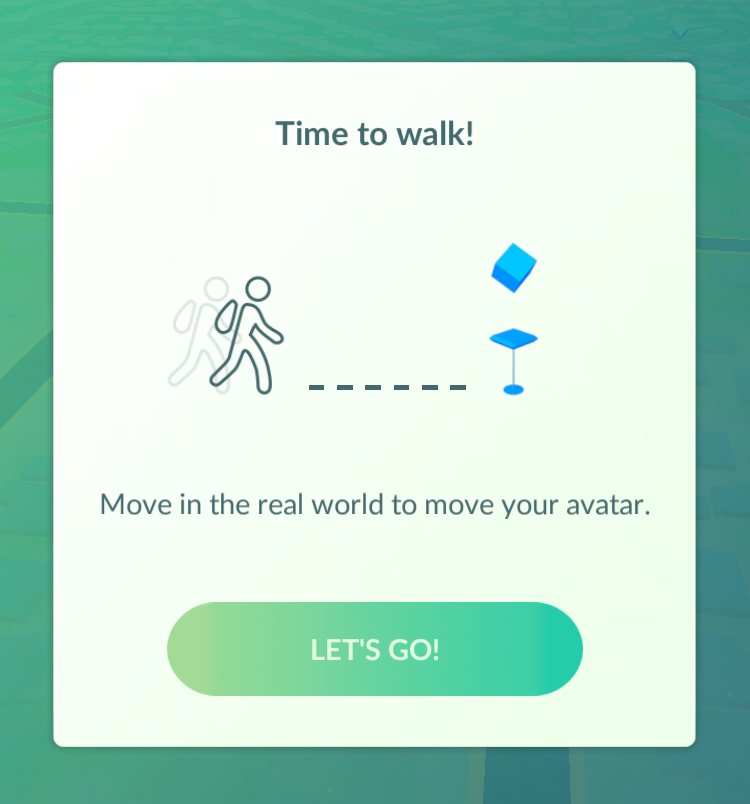
Time to Walk! The game tells you that to move your avatar, you'll need to walk / move around in the real world!


Now is the moment when you realize that this is as far as you can really go with this game, without going for a drive or a long walk...

Well that's the set up process for Pokémon GO! To play the game you will need to move around a lot! I don't know if this game would be great for kids - while it's great because it make you get up and move, it'll make them go to various locations and they'll either try alone, which you wouldn't want, or nag their parents to take them for a drive to who knows where! For adults who grew up with the original Pokémon games and TV series - you can now quit your job and travel the world to become that PokéMaster that you've always dreamed of becoming!

Have you downloaded the game, yet? Let me know what you think of Pokémon GO, in the comments!

Pokémon GO is available to download for FREE (with in-app purchases available) from the App Store.
-> Download Pokémon GO from the App Store


Minggu, 12 Juni 2016

Apple's WWDC 2016 Keynote Event: How To Watch Online


Apple's WWDC (Worldwide Developers Conference) is nearly here! The annual event held by Apple in San Francisco, California, is the time of the year when Apple allows thousands of developers from all around the world to meet with Apple engineers and attend workshops.

Apple kick starts the event with a Keynote presentation that announces what to come from Apple later in the year, relating to software updates. 

This year, Apple is expected to unveil the latest (work-in-progress) updates to iOS, OS X, WatchOS and more... 

Apple will live stream the event on their website and on Apple TV, on June 13th at 10 a.m. PDT. 

If you'd like to watch the Keynote event with commentary from some of the best in tech, I'd recommend you check out TWiT.TV live coverage of the event. 

Rabu, 11 Mei 2016

Instagram Revamps App With First Major Redesign In Years


Instagram is rolling out an update today which features a revamped icon and interface.

The app has gained a new simpler colorful icon and has ditched it's user interface's old color scheme for a 'white and black' one - to add more emphasis on the photos.


"Today we’re introducing a new look. You’ll see an updated icon and app design for Instagram. Inspired by the previous app icon, the new one represents a simpler camera and the rainbow lives on in gradient form. 

We’ve made improvements to how the Instagram app looks on the inside as well. The simpler design puts more focus on your photos and videos without changing how you navigate the app." - Instagram Blog.


There is also icon updates for Instagram's other apps; Layout, Boomerang and Hyperlapse.

What do you think of the new icon and interface colors? Do you give it a heart? Let us know in the comments.


> Instagram (version: 8.0) is available for download for free from the App Store


Selasa, 29 Maret 2016

New Instagram App Update Removes Log Out Button

A new Instagram update has appeared in the App Store, version 7.19 on iOS. While the notes added with the update just talk about the previous added feature of video views, others fear that this update includes much worse - the dreaded new algorithm newsfeed that'll change your timeline from being chronological to what Instagram thinks you'll like best. Pretty much the same crap that Facebook does. 

While personally, I haven't seen the new algorithm take effect, there are some other noteworthy things about this Instagram update. 

Let's start with the good. Instagram has added a new line under usernames of those you don't follow in following and follower lists that'll tell you if anyone you know also follows this person. That a feature that can come in handy. 

Now onto the bad. This update could include the new algorithm, I'm not quite certain. Let me know in the comments if you've already seen the changes take effect. Although Instagram probably doesn't need an app update to change this. But here are some other reasons why you might not want to update so quickly.

It seems users are stuck logged in to their accounts! That's right, once you login and add an account, you can't log out without deleting the entire app off your device. You might say, 'but why would you want to log out?', yeah, true, but since Instagram has added the ability to have multiple accounts that are easily changeable from within the app, removing the log out button seems well let's just say, dumb. Also missing, along with the sign out of accounts buttons is the 'Clear search history' button. 

So, if you haven't already installed the latest Instagram update, maybe hold off for now?

UPDATE: The newest Instagram update (version 7.19.1) has fixed the issues mentioned in this post. 


Rabu, 23 Maret 2016

How To Password Protect Notes in iOS 9.3 on iPhone or iPad

A new feature in iOS 9.3 is the ability to password protect your Notes. This password is not linked to your iOS passcode that you use to unlock your device, however you could always use the same pin I guess, if you're worried about forgetting the password. The password you set will be the same for all notes that you choose to lock. 

How To Password Protect Notes in iOS 9.3:

1. Open the Notes app. 

2. Create a new note, or find an existing one. 


3. Now, on the note you wish to lock, tap the Share button.

4. Now tap, "Lock Note."


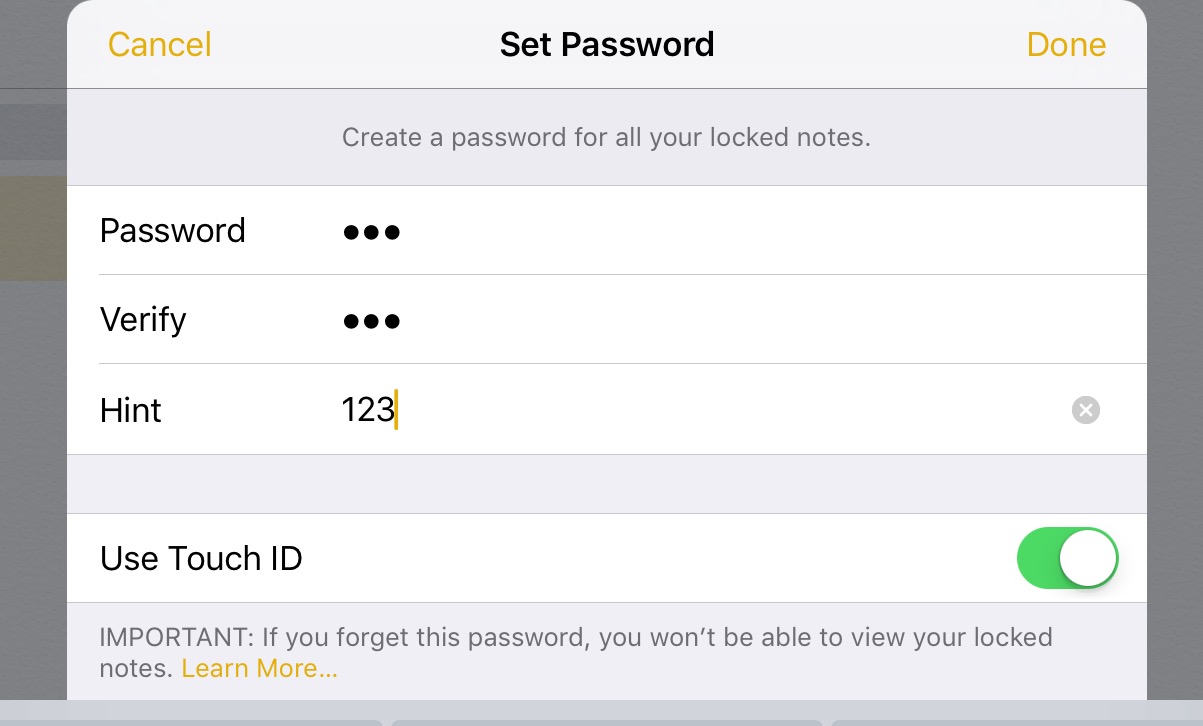
5. Enter a password and choose whether or not to also allow Touch ID to unlock, and tap "Done". Important! if you forget the password - you will lose access to the note! 


6.  Now tap the lock symbol to lock the note. One thing to keep in mind is, the notes heading or first line will still be visible. 

7. To view a locked note, tap the note, then "View Note", and unlock.


8. To Remove a lock, tap the Share button, then "Remove Lock". 


How To Reset Your Notes Password in iOS 9.3:

1. Open Settings app.  

2. Tap "Notes."

3. Tap "Password".

4. If you remember the previous password, you can choose to "Change Password" or you can choose, "Reset Password". *Note: you can reset the password, however previous locked notes will remain locked with the previous password. 

5. To reset or remove password from future notes, tap "Reset Password." 

6. Enter you devices passcode. 

7. Confirm Reset.

8. If you don't want to set a new password, simple press "Cancel" on the 'Set Password' screen.


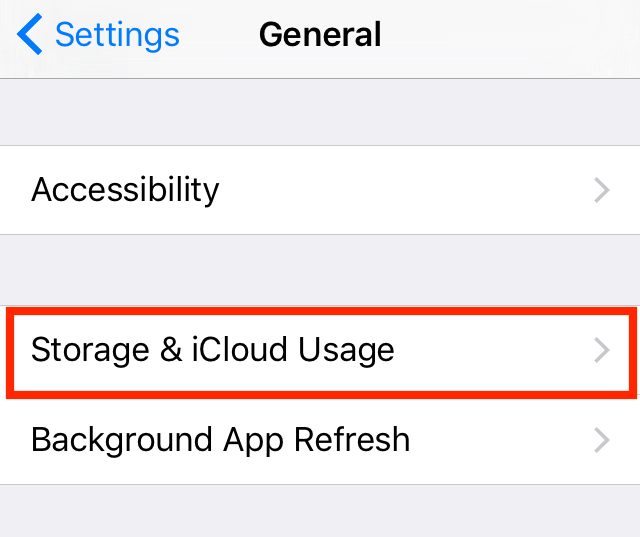
How To Stop iOS OTA Update Once Started on iPhone or iPad

If you start an iOS over-the-air update, that is, a update straight from your iPhone or iPad, from Settings > Software Update, and then need to stop the update before it's done downloading - follow these steps: 

1. Open "Settings" app.  

2. Tap "General." 


3. Tap "Storage & iCloud Usage." 


4. Under Storage heading, tap "Manage Storage."  


5. A list will populate. Find "iOS X.X" on the list, and tap on it. 


6. Now, tap "Delete Update", then again on the pop-up menu to confirm. 

7. To re-download the update, go back to Settings > General > Software Update.    


Minggu, 20 Maret 2016

How To Watch Today's Apple Keynote Event Live!


Apple is holding a media event today (March 21st) at 10 a.m. PDT. 

It's been rumored that Apple will announce a new smaller size 4-inch-iPhone with the internals of an iPhone 6 or 6s. A new 9.7 inch iPad Pro. Possibly new Apple Watch bands, and possibly the release of iOS 9.3. 

Apple will live stream the event from their website and on Apple TV. Check Apple's Event page for more details


Kamis, 17 Maret 2016

Twitter Switches On New 'Best Tweets First' Algorithmic Timeline

Twitter Logo.
When it was announced, there was a out-roar from angry Twitter users who claimed that the new algorithmic timeline would be the end of Twitter. At first, the option was launch as an opt-in feature - but now, it seems that Twitter has switched on the new "best Tweets first" timeline for all users.

'Best Tweets first', is the Tweets that Twitter believes that you will care about the most and would likely engage with. When you login or open the app, these 'best Tweets' will be shown at the top of your timeline feed regardless of when they were posted.

For more detailed information about Twitter's timeline, click here.


How To Switch Off The New "Show me the best Tweets first" Algorithmic Timeline:

on iOS:

1. On your profile tab, tap the settings gear icon and select "Settings."

2. Select the account you want to change.

3. Under Timeline, tap "Timeline personalization."

4. Switch off "Show me the best Tweets first".


On Desktop / Laptop:

1. On the Twitter navigation bar, click your profile image, then select "Settings."

2. On The Account Settings page, scroll down to the Timeline under the Content heading.

3. Uncheck, "Show me the best Tweets first", then click "Save changes" and re-enter your password.


Selasa, 15 Maret 2016

I Side With Apple and Team Apple T-Shirts - Show Your Support For Security and Privacy!

The debate over encryption, right to privacy and security is a tricky one. On one hand - of course we all want our personal details, bank information, passwords, and other important and personal data kept safe and away from hackers. But we also want to stop the bad guys. But lowering our own security cannot be the way to do so. 

Whether it's on a phone, computer, or on one of Apple's apps, a third-party made app, to an app made in another country - if bad guys want to use encryption, they'll find a way. And creating 'a key for under the doormat' is only going to make technology more unsafe for the everyday person.   

If you side with Apple on this debate and want to show your support - check out these #iSideWithApple and #TeamApple t-shirts and hoodies available to buy now. 


Sabtu, 12 Maret 2016

Apple To Hold Media Event On March 21st


Apple has sent out invites for a March 21st event in Cupertino. The invite features the tag line "Let us loop you in", with an Apple logo background image in their device colors of Silver, Space Gray, Gold, and Rose Gold.

It has been rumored that Apple will announce the new iPhone SE; a 4-inch iPhone with the abilities of the iPhone 6s in a smaller case.

A new 9.7 inch iPad, which may pack all the features of the iPad Pro in the smaller shell.

New Apple Watch bands.

iOS 9.3 and possible more...

The Keynote event, which will also be lived streamed via Apple's website and on Apple TV, begins at 10 a.m. PDT on March 21st.

> View Apple Events webpage.


Kamis, 10 Maret 2016

How To Track Your Sleep On Your Apple Watch

Sleep++ promo image.
The Apple Watch can tap you with notifications and other important information, show your messages, you can take a call on the watch, you can track your daily fitness and measure your heart rate, and so much more... But it wasn't really designed to track sleeping. This is mainly for a couple of reasons; 1, you'd have to wear your Apple Watch while you sleep, which might be uncomfortable. And 2, the main reason, at night is when you'll need to charge your Apple Watch so it's ready for the next day.

However, the Apple Watch, with the help of a third party app, is more than capable of tracking you sleep. And since it only takes the Apple Watch two and a half hours to fully charge to 100%, you might be able to charge it at night while you get ready for bed and in the morning while you get ready for work or etc... And since for many users, the Apple Watch's battery is still left with at least a quarter or even third by the end of the night, it won't take the Watch a long time to charge, so you could theoretically wear your Apple Watch while you sleep.  

Sleep++ by Cross Forward Consulting, LLC, is an Apple Watch app designed to track and measure your sleep. Sleep++ uses the motion tracking capabilities of the Apple Watch to measure the duration and quality of your sleep.

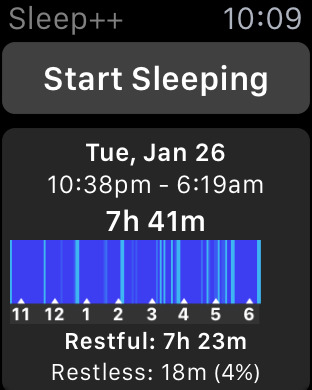
To track your sleeping with Sleep++ all you have to do is: wear your Apple Watch as you sleep, tell the app that you are going to sleep, and then when you wake up. Sleep++ will measure your movement during the night and then analyze your sleeping data and give you a graph and detailed breakdown, including the duration, how long you were restful, restless, awake, and between what times you got your best sleep.

I went ahead and tried out Sleep++. The app recommends that you put your Apple Watch into Airplane mode to preserve battery. As for effects on battery, out of the couple of times that I used that app, I saw a battery drop on average around 4-6% (with the Apple Watch in Airplane mode). Which is not too bad at all.

I will note a couple of things, first, make sure you give permission on your iPhone for Sleep++ to access your Movement and Fitness data - this is required for the app to work. Second, press 'Start Sleeping' on the Apple Watch app before you activate Airplane mode and then 'Stop Sleeping' after you've switched off Airplane mode, because I found that if I put the Watch into Airplane mode first, the data would never copy over to the app on the iPhone.

Sleep++ promo image.
As for the data Sleep++ collected for me during the night, it was interesting but I'm not sure how useful the data would really be for a continuos use. Sleep++ shows you the duration you were 'asleep' (because you told the app), The total time that your were restful, restless, and between what time you had your 'best sleep'. The graph that accompanies the data, shows you on a timescale, the points where in the night you had 'light sleep', or were restless.

An issue I had with Sleep++ was, while the app supports saving data to HealthKit, even with the setting on, there was no data added to the Health app. So there may be a bug there.

Sleep++ did seem to measure my moment well during the night, however I can't be certain - as I was asleep. And it was interesting data to see - even if I only use the app a few times. If you don't think you're getting a good nights sleep - try the app! You may find that you're quite restless during the night and might need to change things up a little to get a better nights sleep.

Sleep++ is FREE to download for iPhone (and Apple Watch) from the App Store.

> View Sleep++ in the App Store


Sabtu, 05 Maret 2016

'Futurama: Game Of Drones' Now Available on App Store & Google Play

Good news everyone! Futurama is back ...as a game on Android and iOS!


Now available in the App Store and Google Play store, Futurama Game of Drones sees the Planet Express crew back in action,  this time delivering drones in a match-4 style game.

Much like other match type games like Candy Crush, Bejeweled, etc... In Futurama: Game of Drones, you have different colored drones to match in a minimum of 4, matching a required number of certain colors to move onto the next stage.

As added extras, there is also power ups, and special items added in the grid for bigger matching effects.

As the story progresses, you can also play with your favorite characters from the TV Show, including; Fry, Bender, Leela, Amy, Zapp, and the Professor.

But the most fun and best parts, to me, of this game are the story cut scene animated comics and 3D world menus.

To get a better idea of the game play, check out the game trailer below.


Sabtu, 06 Februari 2016

American Football iOS Game 'Touchdown Hero' App Review


Touchdown Hero by cherrypick games is a light, fun, and yet challenging, American Football game for iPhone and iPad.

Touchdown Hero is a endless runner style game  where you are a one-man team dodging the opposition team as you run the field scoring touchdowns every few meters. The goal, last as long as you can and score as many touchdowns as you can.

Touchdown Hero features an old school pixeled graphic birds-eye-view camera angle, different colored uniforms to unlock and collect, different playing fields and weather conditions, a slow-motion feature where you can think of strategy while pretending that you can slow down time, and a new 'King of the Rings' game mode where your aim is to collect rings on the field while dodging your opponents.

Touchdown Hero is FREE to download (features in-app purchases and advertisements) for iOS devices (iPhone, iPod touch and iPad) from the App Store.


Kamis, 04 Februari 2016

Pokémon's Super Bowl Commercial


Pokémon is celebrating 20 years! And to celebrate, they even have their own Pokémon Super Bowl spot! Check out the ad 'Train On' above.

Pokémon is also expected to release a new game for mobile on iOS and Android, later this year, titled, Pokémon GO - which will be a virtual reality game, that'll place Pokémon in 'the wild', for everyone to battle, catch, and trade. More details about Pokémon GO is expected to be released this March at GDC 2016.

Check out the official Pokemon20.com site for more.


Selasa, 26 Januari 2016

Australian 9Jumpin Becomes 9Now on App Store


The Australian Television Channel 9 app has gotten an upgrade and a new name today. 9Jumpin is now 9Now.

9Now is a online live streaming and on-demand app. You can watch Channel 9 live, or catch up on shows after they are aired.  You can access 9Now from your phone, tablet, computer, or TV.

So you can watch a range of shows on-demand, and Channel 9 live, with other Channel 9 networks like 9Go and 9Life coming soon.

The video quality seems good and adjusts with your internets connection speed. Note, you may want to make sure you switch on the option "Play on WiFi Only" in the settings, unless you have an awesome mobile data plan.

Now the downsides of the app. To watch anything, you'll need to create an account with 9Now. Also, there is no AirPlay option. And there are advertisements, of course, but that's to be expected, however unlike a recording on a DVR, you can't skip these ads. Other than that, the app seems okay so far.

The 9Now app is FREE to download for iOS (iPhone & iPad) and Android. You can also access 9Now from the web at https://www.9now.com.au


Jumat, 01 Januari 2016

Best Instagram App For iPad - Flow for Instagram - App Review


It's 2016 and can you believe that Instagram still doesn't have an app for the iPad?! They seem to be focused on mobile only – but the iPad does make for a great viewing platform. But it doesn't matter, because if all you want to do is view photos and videos from Instagram on your iPad, there is a great third-party-app available.

'Flow for Instagram' by Codegent Bangkok, is what the iPad app of Instagram should be. Works in both landscape and portrait, Flow features Instagram pictures nicely laid out in a scrollable grid.

Tap a picture to enlarge and show other details that you'd expect like likes and comments. You can even zoom in on pictures by pinching and share, send, or even save to your camera roll* (requires paid version of app).


The main layout of Flow features buttons for:

- Home: the photos and videos from who you follow.
- Your Likes: the pics/videos you've liked.
- Favorites: your bookmarked users, tags, and places.
- Suggested/top pics: like the explore posts on Instagram.
- And Search: where you can search for users, tags, and places.

You also have easy access to other Instagram features like viewing complete pages of who you are following, your followers, requests, search, etc...

In the upgraded paid version (Flow+) you can choose between a light or dark theme for the app. *comes with dark theme - must upgrade for light theme. Also add multiple accounts, hide users posts, get a extended home feed, save pictures and videos and more.

Because this is a third-party-app, you cannot upload images from to Instagram from Flow. But, this app does makes for a great way to view your Instagram feed on your iPad.

Flow for Instagram is available to download for free (with a paid "Plus+" version available through in-app purchase) for iPhone and iPad - from the App Store.

Minggu, 13 Desember 2015

Apple's iOS Autocorrect Suggests "Kardashian" for "Lardass"


Apple has a little hidden Easter egg joke in iOS apart of autocorrect. 

Seen by actress & fashion model, Lydia Hearst and Instagramed by television host Chris Hardwick, when first typing in the word "Lardass", the iOS autocorrect suggests the replacement word, "Kardashian". 

I tried it out for myself - and yep - this is real! Not that I'd doubt Chris Hardwick or Lydia Hearst. However after typing the word "Lardass" the "Kardashian" suggestion doesn't appear anymore. It may be a one off joke. 

Try it out for yourself! 


Selasa, 08 Desember 2015

Apple Releases iOS 9.2 Update With Improvements & Bug Fixes

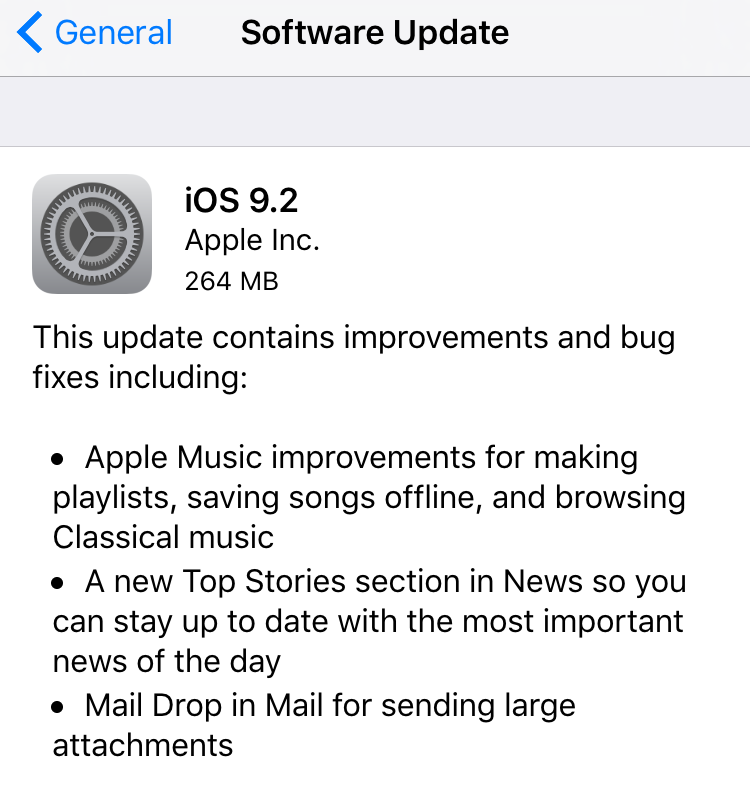
Apple has today released iOS 9.2 update for iPhone's, iPad's... Included in this update is various improvements and bug fixes including: improvements for Apple Music, a new Top Stories in News, and Mail Drop in Mail for large attachments. 

Before updating, remember to backup your iOS device to iTunes or at least iCloud! Then you can update over-the-air on Wi-Fi by going to: Setting > General > Software Update on your iOS device. Or you can also update through iTunes with your device connected to your computer.