Tampilkan postingan dengan label photography. Tampilkan semua postingan

Rabu, 11 Mei 2016

Instagram Revamps App With First Major Redesign In Years


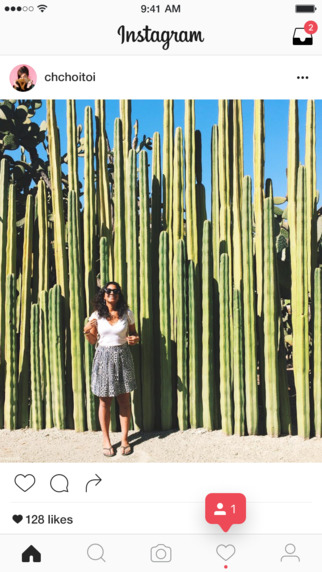
Instagram is rolling out an update today which features a revamped icon and interface.

The app has gained a new simpler colorful icon and has ditched it's user interface's old color scheme for a 'white and black' one - to add more emphasis on the photos.


"Today we’re introducing a new look. You’ll see an updated icon and app design for Instagram. Inspired by the previous app icon, the new one represents a simpler camera and the rainbow lives on in gradient form. 

We’ve made improvements to how the Instagram app looks on the inside as well. The simpler design puts more focus on your photos and videos without changing how you navigate the app." - Instagram Blog.


There is also icon updates for Instagram's other apps; Layout, Boomerang and Hyperlapse.

What do you think of the new icon and interface colors? Do you give it a heart? Let us know in the comments.


> Instagram (version: 8.0) is available for download for free from the App Store. 


Selasa, 29 Maret 2016

New Instagram App Update Removes Log Out Button

A new Instagram update has appeared in the App Store, version 7.19 on iOS. While the notes added with the update just talk about the previous added feature of video views, others fear that this update includes much worse - the dreaded new algorithm newsfeed that'll change your timeline from being chronological to what Instagram thinks you'll like best. Pretty much the same crap that Facebook does. 

While personally, I haven't seen the new algorithm take effect, there are some other noteworthy things about this Instagram update. 

Let's start with the good. Instagram has added a new line under usernames of those you don't follow in following and follower lists that'll tell you if anyone you know also follows this person. That a feature that can come in handy. 

Now onto the bad. This update could include the new algorithm, I'm not quite certain. Let me know in the comments if you've already seen the changes take effect. Although Instagram probably doesn't need an app update to change this. But here are some other reasons why you might not want to update so quickly.

It seems users are stuck logged in to their accounts! That's right, once you login and add an account, you can't log out without deleting the entire app off your device. You might say, 'but why would you want to log out?', yeah, true, but since Instagram has added the ability to have multiple accounts that are easily changeable from within the app, removing the log out button seems well let's just say, dumb. Also missing, along with the sign out of accounts buttons is the 'Clear search history' button. 

So, if you haven't already installed the latest Instagram update, maybe hold off for now?

UPDATE: The newest Instagram update (version 7.19.1) has fixed the issues mentioned in this post. 


Rabu, 10 Februari 2016

Instagram Rolling Out Multiple Account Option


Instagram is finally adding the option to easily switch between and manage multiple accounts from within the app. This is handy for those who have a private and public profile, or for people who also manage an account for their business.

The multiple account feature is slowly rolling out to users, so if you don't have it yet, don't worry, you'll get access to its soon! In the meantime, make sure you have updated to the latest version of the app, from the App Store.

To see if you have the multiple account feature, and to add new accounts:

1. Open the Instagram app.

2. Tap on your profile (the last tab button on the bottom right).

3. Then tap the settings gear in the top right hand corner.

4. Scroll right down to the bottom and between clear history and log out will be a new option that says "Add Account".

5. Tap "Add Account" then login with the new Instagram account. You can add multiple accounts.

6. To switch between accounts, on your profile, at the top next to your username will be a downwards facing arrow. Tap the arrow to show your added accounts. Tap on the account you want to change too.


Jumat, 01 Januari 2016

Best Instagram App For iPad - Flow for Instagram - App Review


It's 2016 and can you believe that Instagram still doesn't have an app for the iPad?! They seem to be focused on mobile only – but the iPad does make for a great viewing platform. But it doesn't matter, because if all you want to do is view photos and videos from Instagram on your iPad, there is a great third-party-app available.

'Flow for Instagram' by Codegent Bangkok, is what the iPad app of Instagram should be. Works in both landscape and portrait, Flow features Instagram pictures nicely laid out in a scrollable grid.

Tap a picture to enlarge and show other details that you'd expect like likes and comments. You can even zoom in on pictures by pinching and share, send, or even save to your camera roll* (requires paid version of app).


The main layout of Flow features buttons for:

- Home: the photos and videos from who you follow.
- Your Likes: the pics/videos you've liked.
- Favorites: your bookmarked users, tags, and places.
- Suggested/top pics: like the explore posts on Instagram.
- And Search: where you can search for users, tags, and places.

You also have easy access to other Instagram features like viewing complete pages of who you are following, your followers, requests, search, etc...

In the upgraded paid version (Flow+) you can choose between a light or dark theme for the app. *comes with dark theme - must upgrade for light theme. Also add multiple accounts, hide users posts, get a extended home feed, save pictures and videos and more.

Because this is a third-party-app, you cannot upload images from to Instagram from Flow. But, this app does makes for a great way to view your Instagram feed on your iPad.

Flow for Instagram is available to download for free (with a paid "Plus+" version available through in-app purchase) for iPhone and iPad - from the App Store.

Rabu, 30 Desember 2015

27 Celebrities On Snapchat That You Can Follow


Snapchat, that popular photo and video sharing app with millennials and I'd say mostly the iGen(eration). But did you know celebrities use the app too? Here is our picks of celebrities that you can follow the story of – on Snapchat:  

Ariana Grande 
Singer and actress. 
Username: moonlightbae

Ashley Benson
Actress. You may know her from TV show, Pretty Little Liars. 
Username: benzo33

Chris Hardwick
Television host. Currently hosts @midnight on Comedy Central. 
Username: chrishardwick

Ciara Hanna
Actress & model. Portrayed the Yellow Ranger on Power Rangers Megaforce/ Super Megaforce. More recently played Heather Locklear on The Unauthorized Melrose Place Story. 
Username: ciarahanna20

iJustine 
You know her as an Apple fan who makes YouTube videos. 
Username: ijustine


Sara Underwood
Model and actress, who was the 2007 Playboy Playmate of the Year. 
Username: sjunderwood

Taylor Hill
Model and current Victoria's Secret Angel. 
Username: taylor_hill

Rihanna
Singer.
Username: rihanna

Hailee Steinfeld
Actress, model and singer. 
Username: haiz

Victoria Justice
Actress and singer. 
Username: victoriajustice

Zendaya
Singer. 
Username: zendaya_96

Mike Shinoda
Musician, rapper, singer... You know him from Linkin Park or Fort Minor. 
Username: mikeshinodalive

Blake Lively
Actress and Model. Portrayed Serena van der Woodsen in CW's Gossip Girl. 
Username: LivelyBK

Kylie Jenner
Reality television personality. 
Username: kylizzlemynizzl

Nick Jonas
Singer/Actor. One of the Jonas Brothers. 
Username: JickNonas

Joe Jonas 
Singer/Actor. One of the Jonas Brothers. 
Username: joseadam

Jessica Alba 
Actress, model and businesswoman. 
Username: jessicamalba

Justin Bieber
Singer. 
Username: rickthesizzler

Bella Thorne
Actress, singer and model. 
Username: BellaThorneDAB

Becky G
Singer and Actress. 
Username: BeckyGofficial

Jennifer Lopez
Singer, actress, among many other things. 
Username: jlobts

Ryan Seacrest 
Radio personality, Television host and Producer. 
Username: ryanseacrest

Selena Gomez
Actress and singer.
Username: selenagomez

Miley Cyrus
Singer and actress. 
Username: MileyCyrus

Niykee Heaton
Singer. 
Username: niykeeheaton

Ed Sheeran
Singer and musician.  
Username: teddysdaytoday

Ellen DeGeneres
Television host / comedian. 
Username: ellen


*We have tried to confirm all the accounts on this list with a verified source, however we can not guarantee their authenticity.  


Who's your favorite celebrity to follow on Snapchat? Add their name and handle in the comments!  


Snapchat is a free to download app (with in-app purchases available) designed for iPhone and Android – available on the iTunes App Store and Google Play.  


Senin, 28 Desember 2015

20 Celebrities To Follow On Instagram (Part 4)

A photo posted by Chloe Bennet (@chloebennet) on


Chloe Bennet
Username: chloebennet

Chris Hardwick
Username: hardwick

Chloe Moretz
Username: CMoretz

Chris Hemsworth
Username: chrishemsworth

Megan Fox
Username: the_native_tiger


20 Celebrities To Follow On Instagram (Part 3)


Nicola Peltz
Username: nicolaannepeltz

Grant Gustin
Username: grantgust

Jennifer Hawkins
Username: jenhawkins_

Emma Roberts
Username: EmmaRoberts6 

Nathan Fillion
Username: natefillion


20 Celebrities To Follow On Instagram (Part 2)


Kendall Jenner
Username: kendalljenner

Robert Downey Jr. 
Username: robertdowneyjr

Katy Perry
Username: katyperry

Miley Cyrus
Username: mileycyrus

Ariana Grande
Username: arianagrande


20 Celebrities To Follow On Instagram

A photo posted by @daisyridley on


Daisy Ridley
Username: daisyridley

Taylor Swift
Username: taylorswift

Rihanna
Username: badgalriri

Melissa Benoist 
Username: melissabenoist

Jennifer Lopez
Username: jlo


Jumat, 23 Oktober 2015

Take Mini Looping Videos with Instagram's New App 'Boomerang'

Image Credit: Boomerang from Instagram
Instagram has released a new app today called, 'Boomerang from Instagram', which almost to me seems to be the Instagram answer to Apple's new iPhone 6S feature, 'Live Photos'.

Taking selfies or filming others, Boomerang takes 10 rapid photos and stitches them together to form a short 4 second looping back and forth video. For best results, Boomerang suggests you film moving objects with this app.

Once you have taken your Boomerang video, you can share it to Facebook or Instagram directly from within the app. It'll also be saved to your Camera Roll.

Some tech specs for those wondering: the saved video file is a .MOV using the H.264 codec at the resolution of full HD, 1080 x 1920.

> Go to: Boomerang from Instagram on the App Store. 


Minggu, 27 September 2015

New in iOS 9: Zoom In Videos, Take Photo While Recording & Change Frame Rate

A new feature added in iOS 9 is the ability to zoom in on videos! Now with any video that you have recorded into your Camera Roll, you can zoom in simply by using 'pinch and zoom'. You can also pan around in the zoomed in video. 

Another new feature added in iOS 9 is the ability to take a photo while recording video. As you are recording a video you'll see another White button on the screen. Tap the white capture button to take a photo while filming. The photo taken isn't as good as a photo that is taken in the normal photo mode, but the resolution is 2720x1532, which is higher than the 1080p of the HD video.

Also new in iOS 9 for your camera - higher HD frame rate. There is a new option to enable 60 frames per second HD video recording, a bump up from the 30fps in iOS 8. Changing the frame rate to 60fps will give you much nicer and smoother motion in your videos. You'll need to enable this in Settings. Go to: Settings > Photo & Camera > under 'Camera' heading, "Record Video" > and select "1080p HD at 60 fps" for the best quality (unless you have a iPhone 6s, then '4K' for the highest picture quality). Remember, higher quality means that it'll use up more space on your iOS device.  


Kamis, 17 April 2014

Flickr Receives Much Needed Redesign Update - iOS & Android


Flickr is a great photo sharing /or storing service. With 1,000GB of free storage you can store heaps of photos and videos!  

Today Flickr has gotten a much needed user interface redesign for iOS and Android. The new look has gone for a darker design. Using transparency and a translucence like iOS 7.

Welcome to Flickr 3.0! We have completely rebuilt and redesigned the app to make it simple, beautiful, and easy to use.
Favorite features:- Capture everything: Take stunning photos and videos. We make it easy.- Save it all: All your pictures in one place. Take them everywhere.- Advanced editing: Gorgeous live filters. Powerful editing tools. All for free.

Among the other features; Flickr can auto upload all your photos. You can make albums. Share photos. Edit your photos with tools and filters.... You can read more about Flickr's features on their app store pages.

A much needed and appreciated update from Flickr. If you're looking for a place to store your photos, you can't go wrong with 1,000 GB of free storage.

You can find the update in your App Store, or download the app for your device from the stores:


Selfies + Drawing = French Girls - Free iPhone App

What do you get when you combined selfies with drawing? You get the app French Girls by Appek LLC.

French Girls is a sharing, drawing app (not just for girls) that encourages you to upload your selfies. Other users of the app will then see your photo and will draw a portrait of you.


The basic concept of the app is - upload your photo (which will share it to the world), and wait for someone to draw a portrait of you (which will also be visible to everyone). The other half of the app is: pressing the draw button - and drawing an portrait of someone else.

There are 4 main buttons in French Girls.
- Draw (pencil) - Randomly get given an photo of a person to draw.  
- Upload Your Picture (camera) - This is where you can take a selfie and upload it to the app. 
- View Gallery (eye) - See a feed of all the photos and drawings by everyone. 
- Your page (French man) - This is where you can see all the drawings you've made and all the photos you've uploaded.  

You can also share photos from the app to various social sites like; Instagram, Facebook and Twitter. Or download photos - and report inappropriate pics. 

The app has a simple and easy to use interface.  And while there are some good artist on the app that draw some nice pictures of their subject (they are rare), most of the drawings are all crude, people advertising their social network pages, or are inappropriate. 

I recommend downloading the app if you want to laugh at a crappy drawing some random stranger has drawn of you. Or if you like drawing strangers. 

French Girls is a FREE app (with in-app purchases available) made for iPhone. Download French Girls from the App Store. 


Senin, 14 April 2014

Follow The Official Peter Griffin On Instagram

Peter Griffin (From Family Guy) has signed up to Instagram to promote his new game Family Guy: The Quest For Stuff!

Peter has already gathered over 130,000 followers in a couple of days. Peter is posting selfies, photos of his family, and his crazy antics.


You can follow Peter Griffin @peterpumpkineater69

Rabu, 22 Januari 2014

Create Your Wedding iBook Photo Gallery with this Template For iBooks Author


Making a Wedding iBook has never been easier, thanks to Apple's iBooks application. And with this template, it's makes it even easier. Within the preset templates on the iBooks Author program, there is no real good template for adding a lot of photos.


This template on offer, features over 60 different layout designs. From text with pictures, to gallery pages, videos with photos, stack of images style pages, different multiple image layout pages and more...

All the layouts are already set up, ready for you to add in your own images and text. This saves you the time of settings up different layouts, and creating a look for your iBook.


The Wedding Book template for iBooks Author features: 
  • Over 60 different preset layouts - ready for you to add your images, and text.
  • Layouts created for text, images, and videos
  • Galleries
  • Images mixed with Videos
  • Photos that can be zoomed in and viewed full-screen 
  • A Landscape orientation view, only 


All the page layout in this template are completely adjustable and customizable. The template is made to be viewed in the landscape orientation, only. You are free to do just about anything with this template. You can edit and adapt. Place you own images and text. Change fonts and colors. Re-arrange layouts. Mix and match parts of the layouts. Create new pages. Copy / duplicate layouts that you want to use and delete those that you do not. Create your own iBooks for personal or commercial use… For full terms and conditions, click here.


Buy Wedding Book Template 
for iBooks Author:


buy 


All files are sold as is. No refunds. 

If you have any questions related to the template file, you can email: appsreviewed@yahoo.com. And I’ll try and answer you as soon as possible. If your questions are about how to use the iBooks Author program, please read the Apple iBooks support site and the iBooks Author - Help, from the Menubar in the program.

apps-reviewed-templates.blogspot.com is not associated with Apple Inc. 

Placeholder images used in the template are Creative Common 'CC0 1.0 universal' licensed photos. 

Minggu, 19 Januari 2014

Best Apps To Create Slideshow Videos For Instagram and Facebook

In my search to find the best app to make a video slideshow, that can be saved, and uploaded to Facebook and Instagram, - I have narrowed it down to two apps. It's a Clash of the Apps: Flipagram Vs. Fliptastic.


First app: Flipagram by Cheerful, Inc. With Flipagram you can make either 15 or 30 second slideshow videos. You can select and edit your photos, choose a title, set duration, and background music, either from your iTunes library on your device, or music through the app.

Flipagram's pros are; it's nice interface. It's ease to use. Music is easy to add.

The Cons: No transitions! That images just flash to the next one. This was the one disappointment I had with Flipagram. Add transitions and it'll be the best.

Price: Free.

Available for iOS (iPhone and iPad) and Android. 


That's brings us to app number 2: Fliptastic by Ting Tze Chuen. You can create 15 second slideshows for either Instagram, or up to 60 seconds long for other sites like Facebook.

You can choose up to 20 photos. Use the photo editing tools to make sure everything is right. Add background music, and transitions! Make your photos either; cross-fade or slide away, and more if you upgrade to the 'Pro' version.

Pros: Easy to use. Good photo editing tools. Transitions!

Cons: I felt that the interface, while good, just wasn't as great as Flipagram's. And music... bought tracks from your library won't work because it says they're copyright protected. And there are only a few 'tracks' available from the app itself.

Price: Free and Paid (Pro) ($0.99) Versions.

Available for iOS (iPhone and iPad).


Conclusion:  

The winner between these two apps is... Flipagram. The interface is better. It's easier to use. There's a wide range of music to select from. The only thing that this app needs is some transitions, so the videos will look more like a slideshow.

Kamis, 09 Mei 2013

Story - By Disney - New Photo App from Disney [VIDEO]

Disney brings the power of story right to your iPhone.

Story, takes the photo's and video's in your library and uses them to create stories.

You can customize your stories. You can add text, captions, change themes and layouts.

To share your stories, you'll need to register an account. Stories can be shared via Email and Facebook.

Check out the TV Spot ad:


- Story is FREE, and is available now for iPhone on the App Store.

Kamis, 02 Mei 2013

Action Movie FX Update, 5 New 'Star Trek Into Darkness' FX's


Action Movie FX has been updated today.

The update adds 5 new (3 for free) 'Star Trek Into Darkness' FX's.

The FX's are: Transporter, Warp!, And free ones: Phaser Fight, Enterprise Flyby and Photon Torpedoes (unlockable).

This new update is for a good cause as well. 100% of the proceeds from the Star Trek pack will be donated to support post-9/11 veterans.

- Download Action Movie FX from the App Store.


How To Tag People In Instagram (Instagram Update, Adds Pictures of You)


Instagram released and update today, it has added added 'Photos of You'!

The new update allows users to tag who are in the pictures and gives you a new tab on your profile that shows photos you been tagged in.


How to Tag People in Old Photos on Instagram:


You can add a tag of who's in a picture on existing photos in your Instagram account by:

- View a photo.

- Click the 'three dots button' on the lower right.

- Then choose 'Add People'

- Now tap on a person, and search for their name to tag.  


Minggu, 17 Maret 2013

Four Instagram Gesture Tips! - Go Back, Favorite and Comment By Using Gestures

Instagram App Logo

Here's a few quick tips for Instagram that you may have never known or stumbled upon.
  •  To go back to the previous page in Instagram all you need to do is swipe from the left to the right.  For example: You're on a profile and you click a photo - to go back to the profile just swipe across to the right. 
Really handy and fast, no need to reach for the back button. I wish a lot of other apps had this gesture added. (By the way, Flipboard also has this gesture!)

  • Second. To favorite a photo - just double tap on the image. 
  • Third - to see all comments quickly - swipe from the right to the left on a image and you'll be taken to the comments page. 
  • And finally, if you're wondering how to delete that comment that you're now thinking you probably shouldn't of wrote - just swipe the comment to the right and there will be a trashcan icon. Also by swiping any comment to the right you can - report the comment or reply to it.  

instagram.com