Tampilkan postingan dengan label networking. Tampilkan semua postingan

Rabu, 11 Mei 2016

Instagram Revamps App With First Major Redesign In Years


Instagram is rolling out an update today which features a revamped icon and interface.

The app has gained a new simpler colorful icon and has ditched it's user interface's old color scheme for a 'white and black' one - to add more emphasis on the photos.


"Today we’re introducing a new look. You’ll see an updated icon and app design for Instagram. Inspired by the previous app icon, the new one represents a simpler camera and the rainbow lives on in gradient form. 

We’ve made improvements to how the Instagram app looks on the inside as well. The simpler design puts more focus on your photos and videos without changing how you navigate the app." - Instagram Blog.


There is also icon updates for Instagram's other apps; Layout, Boomerang and Hyperlapse.

What do you think of the new icon and interface colors? Do you give it a heart? Let us know in the comments.


> Instagram (version: 8.0) is available for download for free from the App Store. 


Selasa, 29 Maret 2016

New Instagram App Update Removes Log Out Button

A new Instagram update has appeared in the App Store, version 7.19 on iOS. While the notes added with the update just talk about the previous added feature of video views, others fear that this update includes much worse - the dreaded new algorithm newsfeed that'll change your timeline from being chronological to what Instagram thinks you'll like best. Pretty much the same crap that Facebook does. 

While personally, I haven't seen the new algorithm take effect, there are some other noteworthy things about this Instagram update. 

Let's start with the good. Instagram has added a new line under usernames of those you don't follow in following and follower lists that'll tell you if anyone you know also follows this person. That a feature that can come in handy. 

Now onto the bad. This update could include the new algorithm, I'm not quite certain. Let me know in the comments if you've already seen the changes take effect. Although Instagram probably doesn't need an app update to change this. But here are some other reasons why you might not want to update so quickly.

It seems users are stuck logged in to their accounts! That's right, once you login and add an account, you can't log out without deleting the entire app off your device. You might say, 'but why would you want to log out?', yeah, true, but since Instagram has added the ability to have multiple accounts that are easily changeable from within the app, removing the log out button seems well let's just say, dumb. Also missing, along with the sign out of accounts buttons is the 'Clear search history' button. 

So, if you haven't already installed the latest Instagram update, maybe hold off for now?

UPDATE: The newest Instagram update (version 7.19.1) has fixed the issues mentioned in this post. 


Kamis, 17 Maret 2016

Twitter Switches On New 'Best Tweets First' Algorithmic Timeline

Twitter Logo.
When it was announced, there was a out-roar from angry Twitter users who claimed that the new algorithmic timeline would be the end of Twitter. At first, the option was launch as an opt-in feature - but now, it seems that Twitter has switched on the new "best Tweets first" timeline for all users.

'Best Tweets first', is the Tweets that Twitter believes that you will care about the most and would likely engage with. When you login or open the app, these 'best Tweets' will be shown at the top of your timeline feed regardless of when they were posted.

For more detailed information about Twitter's timeline, click here.


How To Switch Off The New "Show me the best Tweets first" Algorithmic Timeline:

on iOS:

1. On your profile tab, tap the settings gear icon and select "Settings."

2. Select the account you want to change.

3. Under Timeline, tap "Timeline personalization."

4. Switch off "Show me the best Tweets first".


On Desktop / Laptop:

1. On the Twitter navigation bar, click your profile image, then select "Settings."

2. On The Account Settings page, scroll down to the Timeline under the Content heading.

3. Uncheck, "Show me the best Tweets first", then click "Save changes" and re-enter your password.


Rabu, 10 Februari 2016

Instagram Rolling Out Multiple Account Option


Instagram is finally adding the option to easily switch between and manage multiple accounts from within the app. This is handy for those who have a private and public profile, or for people who also manage an account for their business.

The multiple account feature is slowly rolling out to users, so if you don't have it yet, don't worry, you'll get access to its soon! In the meantime, make sure you have updated to the latest version of the app, from the App Store.

To see if you have the multiple account feature, and to add new accounts:

1. Open the Instagram app.

2. Tap on your profile (the last tab button on the bottom right).

3. Then tap the settings gear in the top right hand corner.

4. Scroll right down to the bottom and between clear history and log out will be a new option that says "Add Account".

5. Tap "Add Account" then login with the new Instagram account. You can add multiple accounts.

6. To switch between accounts, on your profile, at the top next to your username will be a downwards facing arrow. Tap the arrow to show your added accounts. Tap on the account you want to change too.


Jumat, 01 Januari 2016

Best Instagram App For iPad - Flow for Instagram - App Review


It's 2016 and can you believe that Instagram still doesn't have an app for the iPad?! They seem to be focused on mobile only – but the iPad does make for a great viewing platform. But it doesn't matter, because if all you want to do is view photos and videos from Instagram on your iPad, there is a great third-party-app available.

'Flow for Instagram' by Codegent Bangkok, is what the iPad app of Instagram should be. Works in both landscape and portrait, Flow features Instagram pictures nicely laid out in a scrollable grid.

Tap a picture to enlarge and show other details that you'd expect like likes and comments. You can even zoom in on pictures by pinching and share, send, or even save to your camera roll* (requires paid version of app).


The main layout of Flow features buttons for:

- Home: the photos and videos from who you follow.
- Your Likes: the pics/videos you've liked.
- Favorites: your bookmarked users, tags, and places.
- Suggested/top pics: like the explore posts on Instagram.
- And Search: where you can search for users, tags, and places.

You also have easy access to other Instagram features like viewing complete pages of who you are following, your followers, requests, search, etc...

In the upgraded paid version (Flow+) you can choose between a light or dark theme for the app. *comes with dark theme - must upgrade for light theme. Also add multiple accounts, hide users posts, get a extended home feed, save pictures and videos and more.

Because this is a third-party-app, you cannot upload images from to Instagram from Flow. But, this app does makes for a great way to view your Instagram feed on your iPad.

Flow for Instagram is available to download for free (with a paid "Plus+" version available through in-app purchase) for iPhone and iPad - from the App Store.

Jumat, 23 Oktober 2015

Take Mini Looping Videos with Instagram's New App 'Boomerang'

Image Credit: Boomerang from Instagram
Instagram has released a new app today called, 'Boomerang from Instagram', which almost to me seems to be the Instagram answer to Apple's new iPhone 6S feature, 'Live Photos'.

Taking selfies or filming others, Boomerang takes 10 rapid photos and stitches them together to form a short 4 second looping back and forth video. For best results, Boomerang suggests you film moving objects with this app.

Once you have taken your Boomerang video, you can share it to Facebook or Instagram directly from within the app. It'll also be saved to your Camera Roll.

Some tech specs for those wondering: the saved video file is a .MOV using the H.264 codec at the resolution of full HD, 1080 x 1920.

> Go to: Boomerang from Instagram on the App Store. 


Kamis, 08 Oktober 2015

Facebook Messenger Now On Apple Watch


Facebook Messenger is now available on Apple Watch! It was announced that Facebook would be making a Apple Watch App for Messenger at the September 2015 Apple Keynote Event.

Today's update now allows Messenger users to install the app on their Apple Watch running watchOS 2. After installing the Messenger update from the App Store, users will need to go to the Apple Watch app on their iPhone, find and tap the Messenger app in the list, then switch on "Show App on Apple Watch".

With Messenger on Apple Watch, users can now; view existing messages, reply to messages with preset text, your voice, Messenger Stickers, Your Location, or a Thumbs Up. You cannot, however, create a new conversation with someone who's not in your recent messages from Apple Watch.      

The Facebook Messenger [App Store Link] update for iOS 9 and watchOS 2 is now available in the App Store.  


Senin, 05 Oktober 2015

YouTube Material Design Comes To iOS App Store


Google has today released its Material Design makeover for its YouTube app for iOS devices, months after the update was released for Android devices.

The new update brings a redesign that skewers away from the iOS 'look' of the previous version in favor of a Android look.

The redesign offers a new three part system: Home, Subscriptions, and Account, with the buttons in a huge red bar that unnecessarily takes up around one quarter of the screen (on iPhone).

Also included in the update is new in-app editing tool, making it easy for users to create and edit a video on the fly. There is also a new app icon which is the red YouTube play button logo on a white background, matching other Google apps on iOS.

The update is slowing roiling out to users in the App Store, even the redesign may not appear immediately after updating.

> YouTube for iOS is available for free from the App Store.


Senin, 31 Agustus 2015

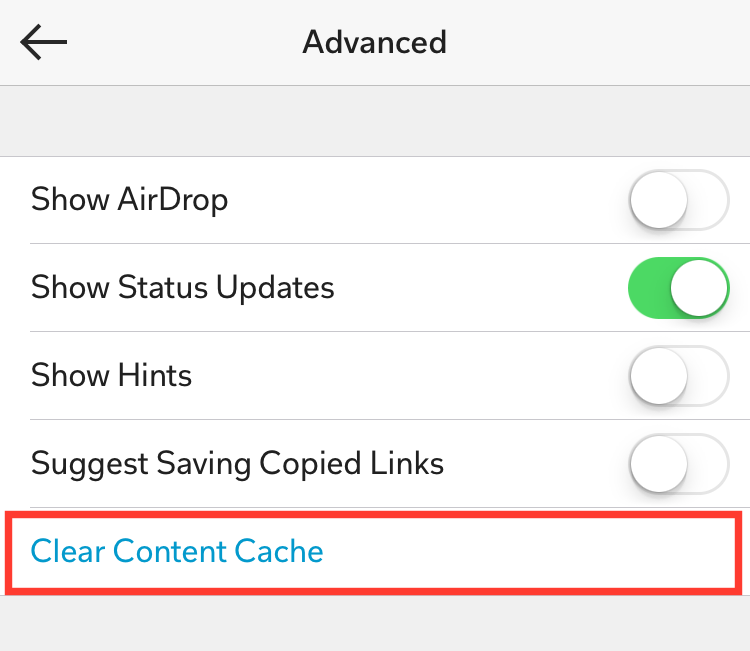
iOS Tip: How To Delete The Flipboard Temp Cache Files


Flipboard, the social network magazine app, temporarily stores downloaded images and other media files on your iPhone / iPad, which makes loading quicker. Apps in iOS usually handle space issues themselves and clear the cache files on a regular basics, however, there is also a way to manually do this.


1. Open the Flipboard app.

2. Tap your Account tab (the person silhouette).

3. Tap the Settings Gear button.

4. Tap 'Advanced'.

5. Tap 'Clear Content Cache'.


How To Disable Facebook Auto-Playing Videos - iOS App Tip


Facebook by default auto-plays the videos in your newsfeed. It can be annoying, and use data unnecessarily. If you have a limited data plan, you may definitely want to switch this off. Thankfully, there is a way to switch this 'feature' off.

How To Disable Facebook Auto-Playing Videos

1. Open the 'Facebook app'.

2. Tap the 'More' tab button.

3. Tap 'Settings'.

4. Tap 'Account Settings'.

5. Tap 'Videos and Photos'.

6. Now tap 'Autoplay' under the Video Settings heading.

7. Under 'Choose Your Own Autoplay Settings', select 'Never Play Videos Automatically'.

There is also another option If you do not want to choose to never automatically play. 'Smart Autoplay', will use Cellular and Wi-Fi data depending on certain criteria, like your country, mobile carrier, battery life, and data usage. Or, you can select to auto-play only when you are connected to Wi-Fi.


Kamis, 20 Agustus 2015

How To Get Twitter Notifications When A Certain User Tweets - iOS Tip


Want to know when a certain Twitter user posts a new tweet? It's really simple to set up. And just to clarify, this will not alert you every time anyone you follow updates, that'd be really annoying! You'll only receive a notification when the people you choose, tweet.

To get a notified when a particular Twitter user updates, on your iOS device (iPhone, or iPad):

1. Go to the persons profile in the Twitter application that you want the notification from.

2. Tap the Settings gear button. 

3. Now tap Turn on notifications. 

4. Confirm if asked. 

To switch off the alerts, go back to their profile, tap the settings button and the option to switch off the notifications will be there. 

If you liked this tip, follow @AppsReviewed1 on Twitter! 


Rabu, 05 Agustus 2015

Facebook Mentions: The App Only For 'Celebrities'


Facebook Mentions is the app for the famous, celebrities, or the verified. If you are not a actor, musician, or other popular famous figure with a verified Facebook page, stop reading now - as this app isn't for you!

Okay now that's it's only the important reading; you might of already heard of Facebook Mentions, as isn't a new app. It's been around since July 2014. It's only available on iOS, but that's ok - you're probably rich, so you should own an iPhone.

Anyway, a newly added feature to Facebook Mentions app, aims to rival other popular live streaming apps. Facebook Mentions is to be the 'Periscope' of the famous (like you). It will be your own little elite app.

The app gives only verified page users a way to live stream and chat with fans, see what topics are trending, share content across Facebook, Twitter, and Instagram, all with just the one app, and more...

In Facebook's own words:
"Mentions is a better way for actors, musicians and other influencers to stay in touch with their fans and the people and things they care about on Facebook."
And what about those regular people - the mere commoners? Where will they go to live stream to their small little audience? They will have to settle for either of the other popular live streaming apps like; Periscope or Meerkat.

Now popular person - go download the Facebook Mentions app - and live stream to your many fans!

-> View Facebook Mentions on the iTunes App Store.


Senin, 03 Agustus 2015

Periscope How To Mute Notifications From A Broadcaster You're Following


Periscope is a great live video streaming app for iOS and Android (and on the web if you're just watching), developed by Kayvon Beykpour and Joe Bernstein - and later purchased by Twitter. 

On Periscope, users can stream live video to their followers, or watch the live streaming video from the people they follow. And to make sure you know when someone you follow is on - the app will send you a notification when they go live. Which is a great and handy feature. 

However, maybe you don't want to know when everyone you follow is live on Periscope. Maybe they live stream a few too many times a day, or you just don't want to watch the live stream. Or whatever the reason. It doesn't necessarily matter if you don't watch live, other than not being able to comment, because videos can be watched for 24 hours after - unless the broadcaster chooses otherwise.  

Thanks to a recent update to the Periscope app, you can now mute the alert when a certain broadcaster you follow, goes live.  It's really simple to do. All you need to do is go the users profile page.

1. Tap the last button on the right (the one the people), to go to the "People" section. 

2. Then tap to go to your profile (the silhouette in the circle on the top right corner). 

3. Tap "Following". 

4. Choose the user you want to mute. 

5. Then tap the bell icon with the line running through it, so it's highlighted in color. (Like in the image above). 

If you ever want to un-mute that user, just tap that bell icon again so the button goes back to white. 


Jumat, 24 Juli 2015

YouTube Mobile App Gets Redesign & Vertical Video Fullscreen Playback

New YouTube Mobile App Redesign (Android) 
Today the YouTube mobile app has gotten a new 'material design' upgrade, with added new features. The new interface is available for Android users now, with the iOS update coming soon.

The new update features include a simplified three new tab interface; Home, Subscriptions, and Account.

Also, we may hate when people record video in vertical mode, but before it was even more frustrating trying to view the thin videos on a mobile device. Well, todays new update (iOS included) also adds support to play vertical videos in fullscreen mode.

Another new added feature to the redesigned YouTube app is a new set of video creation tools. You can now use the YouTube app to trim your footage, add filters, music, and upload - all from within the one app.

-> Read more about the new YouTube app on the Official YouTube Blog.  


Kamis, 24 April 2014

How To Disable Facebook Auto-Play Videos on iPhone/iPad & Web

We all now that videos can use a lot of data, and if you're not connected to Wi-Fi, you could use up a lot of data just by browsing Facebook on your mobile device. If you're like the many people who hate that Facebook now auto-plays videos, here's how to switch the feature off on mobile (iPhone/ iPad) and on your desktop/laptop computers.


How To Disable Facebook Auto-Play Videos on iPhone/iPad

On iOS you can disable auto-playing videos if you are not connected to Wi-Fi internet. Great way to save mobile data. If you are on Wi-Fi, the videos will still play. There is no way to disable them. 

1. If you're on a iPhone or iPad, head over to the iDevices Settings app. 
2. In Settings, find and open the Facebook app. 
3. Then tap Settings. 
4. Under "Video", switch on the option, Auto-play on Wi-Fi only.


How To Disable Facebook Auto-Play Videos on the Web

On the web version on Facebook, can can disable auto-playing videos. 

1. On the Facebook navigation bar, click the drop down arrow on the top right corner. 
2. Now from the drop-down menu, click Settings. 
3. On the left side of the page, click Videos. 
4. Now switch the "Auto-Play Videos" option to Off. 

Kamis, 17 April 2014

Flickr Receives Much Needed Redesign Update - iOS & Android


Flickr is a great photo sharing /or storing service. With 1,000GB of free storage you can store heaps of photos and videos!  

Today Flickr has gotten a much needed user interface redesign for iOS and Android. The new look has gone for a darker design. Using transparency and a translucence like iOS 7.

Welcome to Flickr 3.0! We have completely rebuilt and redesigned the app to make it simple, beautiful, and easy to use.
Favorite features:- Capture everything: Take stunning photos and videos. We make it easy.- Save it all: All your pictures in one place. Take them everywhere.- Advanced editing: Gorgeous live filters. Powerful editing tools. All for free.

Among the other features; Flickr can auto upload all your photos. You can make albums. Share photos. Edit your photos with tools and filters.... You can read more about Flickr's features on their app store pages.

A much needed and appreciated update from Flickr. If you're looking for a place to store your photos, you can't go wrong with 1,000 GB of free storage.

You can find the update in your App Store, or download the app for your device from the stores:


Minggu, 13 April 2014

Narwhal - A New Awesome App For Reddit - iPhone

Narwhal for Reddit By Rick Harrison is a new client application for the popular social sharing website Reddit.

Narwhal features a iOS 7 inspired design, using a color palette similar to the official Reddit colors. The interface is clean looking and well thought out. 

You can access; front page, new, hot, rising and controversial, from a pull down menu. From the site 'hamburger' (three line) menu, you can access all the other sub-reddits, find users, and edit preferences. You can also easily share Reddit posts to social networks. 

If you don't have a Reddit account, this app is free. But by upgrading the app to the paid version (for $1.99), you can sign in using your Reddit account, and access features; messages, add new posts, comment, subscribe to sub-reddits, vote on posts with simple swipe gestures, save/hide posts using gestures... 

Narwhal is a nice new promising app for Reddit. If there is a feature you think is missing, there is apparently more features to come in future updates.

Narwhal for Reddit is FREE to download, contains an in-app purchase for a 'pro version' ($1.99). The app is designed for iPhone, and can be downloaded from the App Store. 

Selasa, 25 Maret 2014

Twitterrific 5 - Currently FREE For iOS - Download Now!


I used to be a big fan of Twitterrific by The Iconfactory, and would use the app before there was a official Twitter application for iPhone and iPad. But Twitterrific has always been a great alternative client app for Twitter. Twitterrific most recent version is Twitterrific 5.

Twitterrific has a lot of great features including; a iOS 7 style interface, live timelines streaming, push notifications, automatic switching to night theme, timeline syncing, multiple account support with fast switching, and a lot more... Check out the full feature list on Twitterrific's App Store page.

Twitterrific 5 is currently FREE to download (at time of posting), a saving of $2.99. If you're looking for an alternative to the official Twitter app, check out Twitterrific 5.

Twitterrific 5 is available for iOS (designed for iPhone & iPad). Download Twitterrific 5 now, from the iTunes App Store. 


Senin, 24 Maret 2014

'Redd' The iOS App Client For Reddit With The Best Visual Interface - App Review


For a while now I had been using the app client Alien Blue for Reddit, until I came across a recently gone free app for iOS (designed for iPhone & iPod Touch) called, Redd - Reddit client by Craig Merchant. Redd is actually a really great app for Reddit. A a recent update has made the app, even better.

Redd has a really nice clean interface. It looks the part for iOS 7. The app divided by tabs on the bottom of the app. There's: Hot, New, Rising, Controversial, and Top. These also work for each category you enter. The categories can been accessed from the three line "hamburger menu" on the top left corner.

The Features of Redd:

- Search and browse your favorite subreddits
- Add and reply to comments and stories

- Upvote and Downvote stories and comments
- Share stories to your favorite services
- Add your own text, link, or photo stories
- Upload single or multiple photos quickly and easily straight to imgur
- Browse photo galleries in our built in photo viewer
- Night mode
Redd, in a recent update included a really useful feature - Night mode. A dark interface, consisting mainly of blacks and grays, that helps eyes read a little better at night. This mode can work without any user interaction. Once switched on, just set daily times (i.e: 10pm - 6am), and Redd will automatically switch Night mode on for you.  

My dislikes with Redd: There are a few things that I would change. I'd add a share button. You can share things like photos that other users have uploaded, but you can't seem to share the whole posting. Not a big fan of the gray writing in the posts and comments, could be a shade darker. Adding Reddit Messages is an important feature that should be added, too. Another thing that Redd may want to add is a native iPad version. As a lot of people now do there reading on iPad's, I'm sure they'd appreciate this feature. And if I'm going to really nitpick, I'd make the logo on the app icon a bit smaller. It's not evenly boarded.

In the Settings, you can of course login with your Reddit credentials. You can switch on 'Hide NSFW Content'. And change text size.

Visually, Redd is the best app client for the Reddit website. It may not contain all the features for the pro' Reddit users, but I'd still recommend you check it out.


Redd - reddit client is currently priced at FREE, and is available to download for iOS devices (Designed for iPhone). 


Kamis, 20 Maret 2014

How To Block Facebook Apps, Games / Stop App Notifications


One of the most annoying Facebook Notifications are those Game / App requests and invitations that come from your friends. There are some ways to stop these notifications, that do not include removing that friend. Although, that could be a good solution too.


How To Stop Mobile (iPhone, iPad) Facebook App Push Notifications / Requests / Invites:

Notifications on your iPhone or even iPad should be of some importance, not someone has invited you to play some game.

1. Launch the Facebook app for iOS.
2. Tap the 'More' tab.
3. Scroll down to, and tap 'Settings'.
4. Now tap 'Notifications'.
5. Then tap 'Mobile Push'.
6. Find, and then uncheck: 'Application Requests' & 'Application Invites'.


How To Block Facebook Apps / Games: 

If you get a lot of requests from a certain app that you don't want /or use, a good option is to block that application. By blocking the app, you'll become invisible to it. Your friends will no longer be able to send you requests or invitations, and you'll no longer see the app. This is the perfect way to not have to deal with the certain app ever again.

You'll need to login to Facebook's desktop version for this method.

1. Login to Facebook. (Obviously).
2. Click the Settings Gear.
3. Then 'Settings'.
4. From the left hand-side menu, click 'Blocking'.
5. Scroll down to 'Block Apps'.
6. Type the name of the App you wish to block, and select it from the popup list.


How To Switch Off All Facebook Apps:

I would NOT recommend this, because it'll disable all Facebook apps, even the ones you may use or want to use. But, if you never want to use a Facebook application, follow these steps to switch off the Facebook App platform.

1. Login to Facebook. (Obviously).
2. Click the Settings Gear.
3. Then 'Settings'.
4. From the left hand-side menu, click 'Apps'.
5. Under 'Apps you use', where it says "Use apps, plugins, games and websites...", click 'Edit'.
6. Now click 'Turn Off Platform'. Remember to read all the warnings, and make sure you understand what doing this, will do, before you click the button.